Key CMS Trends 7 Shifts to Plan Your Stack Around

Choosing a CMS used to be an IT decision about where web pages live. In 2027, it shapes outcomes the business answers for: how fast marketing can take a campaign to market, whether buyers find your brand when they ask an AI assistant instead of a search engine, and what it costs to keep the same content accurate across a website, apps, and partner channels. For companies serving EU consumers, it also determines whether accessibility compliance is built into the system or rests on individual editors.
That is why the CMS trends below matter beyond the development team. Each one changes what your content platform contributes to revenue, cost, or risk, and all of them are cheaper to act on before your next platform decision than after it.
Key takeaways
CMS trends for 2027 trace back to two forces: AI systems that read and edit content, and the growing number of channels each piece of content has to reach.
AI agents are becoming CMS users. Platforms now expose content operations to agents through MCP servers, so permissions for agents matter as much as permissions for people.
Structured content is the base for AI search visibility. Facts stored in fields are easier for answer engines to parse and attribute than text locked in page templates.
Headless is now the default for multi-channel teams, and visual editors give marketers the page-building speed they expect.
Traditional platforms are adapting: WordPress added AI tooling to its core release in May 2026, even as its share of the web declines.
In the EU, accessibility is a legal requirement for many consumer-facing services, and a CMS can enforce most of it by design.
What is driving CMS trends in 2027?
Most CMS trends for 2027 come from two changes: AI now reads and edits content alongside people, and content has to reach more channels than one system was built to serve. The CMS software trends below are how vendors and in-house teams are responding to one or both.
The first change started in the search. In February 2024, Gartner predicted that traditional search engine volume would fall 25% by 2026 as people move their questions to AI assistants. Whatever the final figure, the effect for content owners is the same: a growing share of your pages is read and summarized by software before a person sees them.
The second change happens inside companies. A website is now one channel among several: apps, marketplaces, in-store screens, partner portals, and AI assistants all need the same product facts and the same brand voice. A CMS designed around web pages turns every new channel into a copy-and-paste job.
Both forces put the same question at the center of every CMS decision: how your content is structured.
CMS trends at a glance
Seven shifts stand out for 2027. The table sums them up, and the sections below explain each one.
| Trend | What changes | Who feels it first |
|---|---|---|
| AI agents join the editorial team | Agents draft and update entries through CMS APIs | Content teams publishing at high volume |
| Content modeled for AI search | Structure decides whether AI assistants cite you | SEO and content leads |
| Headless becomes the default | One content source feeds every channel | Companies with apps or several markets |
| Composable stacks replace suites | Each tool in the stack can be swapped on its own | Enterprise and commerce teams |
| Visual editing in headless platforms | Editors build pages from components with live preview | Marketing teams |
| Traditional platforms rebuild around AI | WordPress 7.0 brings AI infrastructure into core | WordPress site owners |
| Accessibility and governance in the content model | EAA rules and AI policies are enforced by the CMS | Businesses serving EU consumers |
7 CMS trends to plan for in 2027
1. AI agents join the editorial team
AI agents are starting to work inside the CMS itself, drafting entries, translating pages, tagging assets, and running bulk updates through the same APIs your developers use.
The shift reaches well beyond content tools. Gartner expects 40% of enterprise applications to include task-specific AI agents by the end of 2026, up from less than 5% in 2025. Content platforms are moving on the same timeline. Headless CMS vendors including Storyblok, Sanity, and Contentful now provide servers for the Model Context Protocol (MCP), an open standard developed by Anthropic that lets AI assistants connect to external tools and data.
An MCP server turns your content API into a set of actions an agent can call: create an entry, update a field, upload an asset, publish a page. Storyblok, for instance, runs read operations in a separate read-only mode, so an agent can explore a workspace without changing anything.
For editorial teams, the gain is time on repetitive work, such as localizing 400 product descriptions or fixing metadata across an entire blog. The risk is an agent publishing something nobody reviewed. So the question to ask of any CMS in 2027 is how it controls agents: which content types an agent can touch and whether it can publish or only save drafts. Every agent change should also land in an audit log.
2. Content is modeled for AI search
AI assistants and search summaries quote the content they can parse, so the structure behind a page now affects its visibility as much as the copy on it.
The traffic stakes are measurable. Pew Research Center analyzed March 2025 browsing data from 900 US adults and found that users clicked a traditional search result in 8% of visits when Google showed an AI summary, vs 15% when it did not. Links cited inside the summaries themselves rarely got a click.
When fewer people click, being the source an AI answer cites becomes the visibility that counts. Content stored as one block of HTML inside a page template is hard for these systems to interpret. Content stored as typed fields (a question and its answer, a price, a step, an author with credentials) is easier to parse and attribute. In practice, that means:
Model FAQs, specifications, and how-to steps as separate content types with their own fields
Generate schema.org markup automatically from those fields
Make author, credentials, and review date required fields
Keep stable URLs and IDs, so citations keep pointing to the right page
Most of these changes depend on the content model, so they rarely require a new platform.
3. Headless CMS trends: from experiment to default
The defining headless CMS trend for 2027 is maturity: headless is now the standard choice for companies that publish to more than a website, and hybrid setups give traditional platforms a way in.
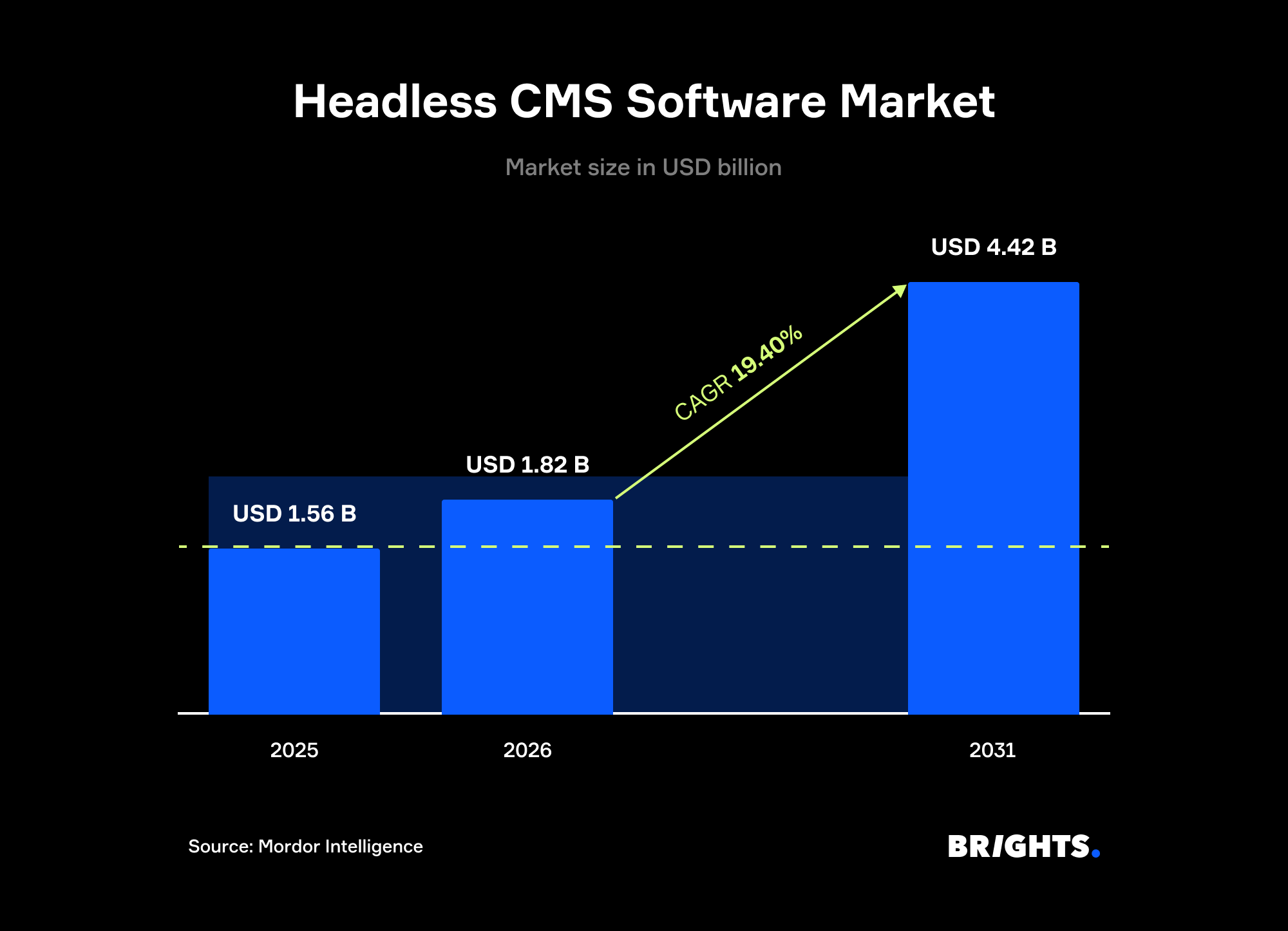
Market forecasts point the same way. Mordor Intelligence expects the headless CMS software market to grow from $1.56B in 2025 to $1.82B in 2026 and reach $4.42B by 2031, a 19.4% CAGR from 2026 through 2031. The growth comes from enterprises moving off page-based systems to API-first platforms, where one structured content layer serves websites, mobile apps, retail screens, and voice interfaces.
A headless CMS stores each piece of content once and delivers it through APIs to every front end, AI assistants included. That separation ends the habit of keeping copies of the same text across brands and languages, and it shortens the path from draft to published page.
The cost of that habit shows in Storyblok's State of CMS 2025, a vendor survey of 1,300 CMS users: 61% of respondents use more than one CMS, and 44% say they need several systems to cover all their channels. Each extra system adds another editing workflow and another place where a price or a disclaimer can go stale.
Hybrid headless covers the middle ground. Many traditional platforms now deliver content through APIs too: WordPress can act as the content backend for a Next.js front end, and Umbraco has a headless delivery option. For a team with years of content in WordPress, that can be a lower-risk first step than a full migration.
If you are comparing platforms, our guide to the top 12 headless content management systems covers where Storyblok, Sanity, Contentful, Payload, and others fit, with a decision framework by team type.
4. Composable stacks replace all-in-one suites
Composable architecture means assembling your digital experience from separate, API-connected tools, such as a CMS, a commerce engine, search, and analytics, so each part can be replaced without rebuilding the rest.
Gartner expects this approach to become the norm. Its 2025 Magic Quadrant for Digital Experience Platforms predicted that by 2026 at least 70% of organizations would be required to acquire composable DXP technology over monolithic suites, up from 50% in 2023.
Inside such a stack, a composable CMS is the content layer: it handles structured content and editorial workflows, and leaves commerce and search to specialized tools. The appeal is flexibility. When a better search engine or personalization tool appears, you swap one component. The trade-off is integration work. Someone has to own the connections between services and the monitoring that catches a broken webhook before customers do.
Reno, a Polish manufacturer of made-to-measure sliding doors, shows how the parts fit. Saleor runs the commerce layer, Storyblok and Prismic handle editorial content, and Apollo GraphQL joins them into one React front end. That composition made room for a real-time door configurator, the feature that required a headless build in the first place.
5. Visual editing becomes a deciding factor
Marketers judge a CMS by how fast they can build and preview a page, and headless vendors have answered with visual editors that show the real page while editors work.
The demand is clear in the same State of CMS 2025 survey: visual editing was the feature respondents rated most important (65%), ahead of centralized content management and collaboration (55%).
Early headless platforms gave editors forms with fields and no preview, which pushed simple layout changes back to developers. Current tools close that gap in different ways. Storyblok's Visual Editor shows components on the live page as editors arrange them. Prismic uses Slice Machine: developers define reusable page sections in code, and editors assemble pages from that library in a page builder with live preview.
The result is a design system and a content model that work as one: a library of approved components editors combine freely. Brand consistency holds, and a new landing page no longer waits for a release cycle.
6. Traditional platforms rebuild around AI
Traditional CMS software is adding AI infrastructure to keep pace, and WordPress, the most widely used CMS, built it into core in 2026.
WordPress 7.0, released May 20, 2026, added a provider-agnostic AI Client, an Abilities API, a Connectors screen for AI providers, and the first stage of an admin redesign. The AI Client lets plugins call models from providers such as OpenAI and Anthropic through one interface, while the Abilities API describes what a site can do in a form AI tools can discover. Real-time collaborative editing, the release's most anticipated feature, was pulled before launch to be reworked for a later version.
The release lands while WordPress's share slips. According to W3Techs, WordPress powered 39.6% of all websites on October 20, 2026, down from about 43% at the start of the year. It still holds 58.3% of the CMS market, so the platform remains the default for a large part of the web.
For a WordPress site that serves one channel well, 7.0 mainly means new AI features arriving through plugins. The bigger question is whether your site has outgrown what plugins can safely handle: several channels, heavy integrations, or a plugin list nobody wants to update. If it has, the time before a migration is best spent cleaning the content model.
7. Accessibility and governance move into the content model
Since June 28, 2025, the European Accessibility Act (EAA) has required many consumer-facing digital services in the EU, including e-commerce, to meet common accessibility requirements. The CMS is where much of that work succeeds or fails.
Directive (EU) 2019/882 also covers companies based outside the EU when they serve EU consumers, while microenterprises providing services are exempt. Its technical benchmark, the harmonized standard EN 301 549, references WCAG 2.1 level AA for web content.
Many accessibility failures start in the editor: an image uploaded without alt text, a heading picked for its font size, a link labeled "click here," a PDF attached in place of an HTML page. A CMS can prevent most of them by design:
Required alt text fields, with an explicit option to mark an image as decorative
Components that output correct heading levels, whatever visual style an editor picks
Color and contrast values locked to accessible options in the component library
Automated checks in the publishing workflow that flag issues before content goes live
The same logic applies to AI use. In Storyblok's State of CMS 2024 survey, 74% of respondents said their company has rules for AI tools. Those rules carry weight only when the CMS enforces them. Role-based permissions and audit logs turn a policy document into something the system applies to every editor, human or AI.
Which CMS architecture fits your 2027 roadmap?
The right architecture depends on how many channels you publish to and how much integration work your team can own. Most companies don't need the most flexible option on day one.
| Architecture | Best for | Editor experience | AI and multi-channel readiness | Main trade-off |
|---|---|---|---|---|
| Traditional CMS | A single website run by a small team | Familiar page editor and themes | Depends on plugins; content is tied to page templates | Plugin upkeep and slower pages as the site grows |
| Hybrid headless | Teams with a large content library adding an app or a new front end | Editors keep the tool they know | Content is available through APIs, shaped by the legacy model | Constraints of two systems at once |
| Headless CMS | Multi-channel publishing, design systems, several markets | Visual editing on current platforms, forms on older ones | Structured, API-first content by default | A separate front end to build and maintain |
| Composable stack | Enterprises combining content, commerce, and search | Depends on the CMS chosen | Every part can be replaced on its own | Integration ownership and higher upfront cost |
Case study: How ProCredit Bank manages a 200-plus-page site on a headless CMS
ProCredit Bank is a German development-oriented international banking group headquartered in Frankfurt am Main, serving small and medium-sized businesses and private clients. Brights worked with ProCredit Bank Ukraine, a market where the group has operated for over two decades.
The bank’s previous website no longer matched its corporate identity, and every content update meant looping in developers. After a discovery phase, Brights built a custom 200-plus-page site on Payload CMS, React.js, Next.js, and Node.js, with accessibility as a core requirement from the first design. Three months after the April 2026 launch, organic traffic had grown by 285%.
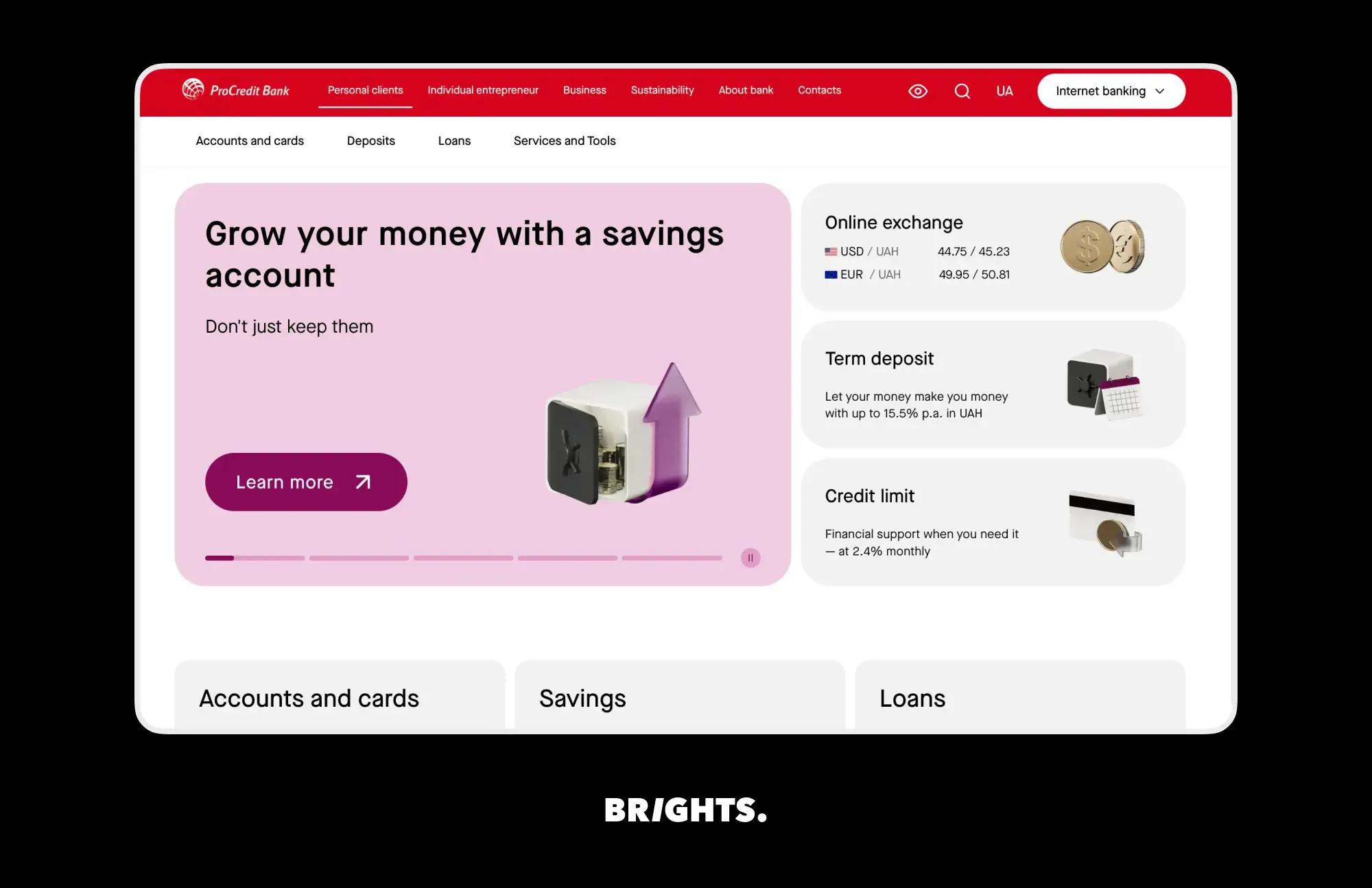
What we delivered
A component-based page builder that lets the bank’s team create, edit, and publish pages on its own, with bilingual content managed from one admin panel
An accessibility control panel on every page for font size, spacing, color scheme, images, and animations, plus screen reader support and full keyboard navigation
Account-opening and visit-booking flows built around the bank’s processes, with every booking sent to its CRM via API
Deposit and loan calculators that factor in rates, terms, and loyalty conditions, with settings the team updates from the admin panel
Is your CMS ready for 2027? A quick check
Six questions show where your current setup stands. If you answer "no" to two or more, start with the content model before any platform decision.
| Question | What a "no" costs you | First step |
|---|---|---|
| Can editors publish a new landing page without a developer? | Campaigns wait for release cycles | Build a component library with visual editing |
| Are key facts (FAQs, specs, prices) stored in structured fields? | AI assistants struggle to parse and cite them | Remodel your 10 highest-traffic pages first |
| Does one source of content feed every channel? | Duplicated content drifts out of sync | Map which content is copied across systems |
| Can you give an AI agent a limited role with an audit log? | Agents get all-or-nothing access | Define agent roles before connecting AI tools |
| Do your components enforce alt text and heading structure? | Accessibility depends on each editor's memory | Fix the templates and add checks to publishing |
| Does every integration have a named owner? | Broken connections go unnoticed | Assign an owner and an alert to each integration |
How Brights can help
Brights builds and migrates content platforms for companies whose websites and apps have outgrown their CMS. Over 15 years and 300+ launched projects, our team has worked with Storyblok, Prismic, Hygraph, Contentful, Payload, Strapi, and Saleor, as well as WordPress and Drupal in hybrid setups.
Our headless CMS development services cover the full path:
Platform selection, with a comparison of cost, editor experience, API depth, and scalability for your team
Content modeling workshops that turn your pages into reusable, structured content types
SEO-safe migration from WordPress, Drupal, or other monolithic platforms, with URL mapping and metadata carried over
Integrations with your CRM, PIM, DAM, commerce, and analytics tools
Support after launch, including security updates and performance monitoring
References
Gartner Predicts 40% of Enterprise Apps Will Feature Task-Specific AI Agents by 2026
The MCP Server: Why Your Content Infrastructure Needs to Be Agent-Ready
Google users are less likely to click on links when an AI summary appears in the results
WordPress 7.0 Ships with AI Foundations in Core, a Modernized Admin, and New Design Tools
Directive (EU) 2019/882 on the accessibility requirements for products and services
FAQ.
Seven shifts lead the list: AI agents working inside the CMS, content modeled for AI search, wider headless adoption, composable stacks, visual editing in headless platforms, AI infrastructure in traditional CMSs, and accessibility and governance enforced through the content model. Most of them depend on how well your content is structured.


