DevOps for SaaS Projects: Why It Matters and How to Get It Right in 2026

Running a SaaS product means you’re shipping all the time, often while the system underneath keeps getting more complicated. At some point, teams start looking at DevOps for a SaaS platform simply because delivery and operations feel harder than they should.
That’s something Brights sees often in practice. As our DevOps engineer Yurii K. explains:
“DevOps helps SaaS teams scale while keeping stability, infrastructure costs, and security under control. The focus is on shipping faster without constant concern about whether the system will hold up after each release.”
Many teams understand how DevOps can benefit SaaS, but struggle to move forward. A 2024 Redgate report found that 42% of companies point to missing in-house skills as the main barrier to adopting DevOps.
In this article, Brights’ DevOps team shares what DevOps looks like in real SaaS environments, the challenges teams often face, and how priorities shift as the product grows.

All-in-one banking and payment platform developed by Brights
Key takeaways
In SaaS projects, DevOps connects development, testing, and deployment into a continuous workflow, replacing handoffs between teams with shared dashboards and pipelines, so developers, QA, and operations can all see deployment status, test results, and production health in one place.
DevOps specialists typically focus on automation, infrastructure setup and maintenance, monitoring and observability, and keeping security aligned with how the product evolves.
A core DevOps SaaS benefit is the ability to scale without losing oversight of deployment quality or infrastructure spending as release frequency increases.
DevOps priorities shift as a product matures: early-stage teams start with basic deployment automation, while established SaaS products require stable CI/CD pipelines, orchestration, and support for higher workloads.
Different DevOps roles address different operational needs, from release coordination and automation design to testing, quality assurance, and security compliance.
For most SaaS products, DevOps services add around $1,000–$2,000 to the overall development cost, influenced by system complexity and the level of automation required.
When does your SaaS project need DevOps services?
DevOps is often described as a way to bring development and operations closer together. In SaaS projects, that gap becomes obvious once release frequency increases and teams start getting in each other’s way.
DevOps for SaaS applications puts development, QA, and deployment into a shared workflow. The point isn’t to add more processes, but to avoid familiar problems: features that pass QA but fail in production, deployments that unexpectedly affect other services, or ops teams finding out about changes only after users report issues.
DevOps also isn’t a one-size-fits-all setup. What it looks like changes as your SaaS product grows, with priorities shifting based on scale, team setup, and system complexity. That’s why we asked a Brights DevOps engineer to explain how DevOps responsibilities evolve at different stages of a SaaS project.
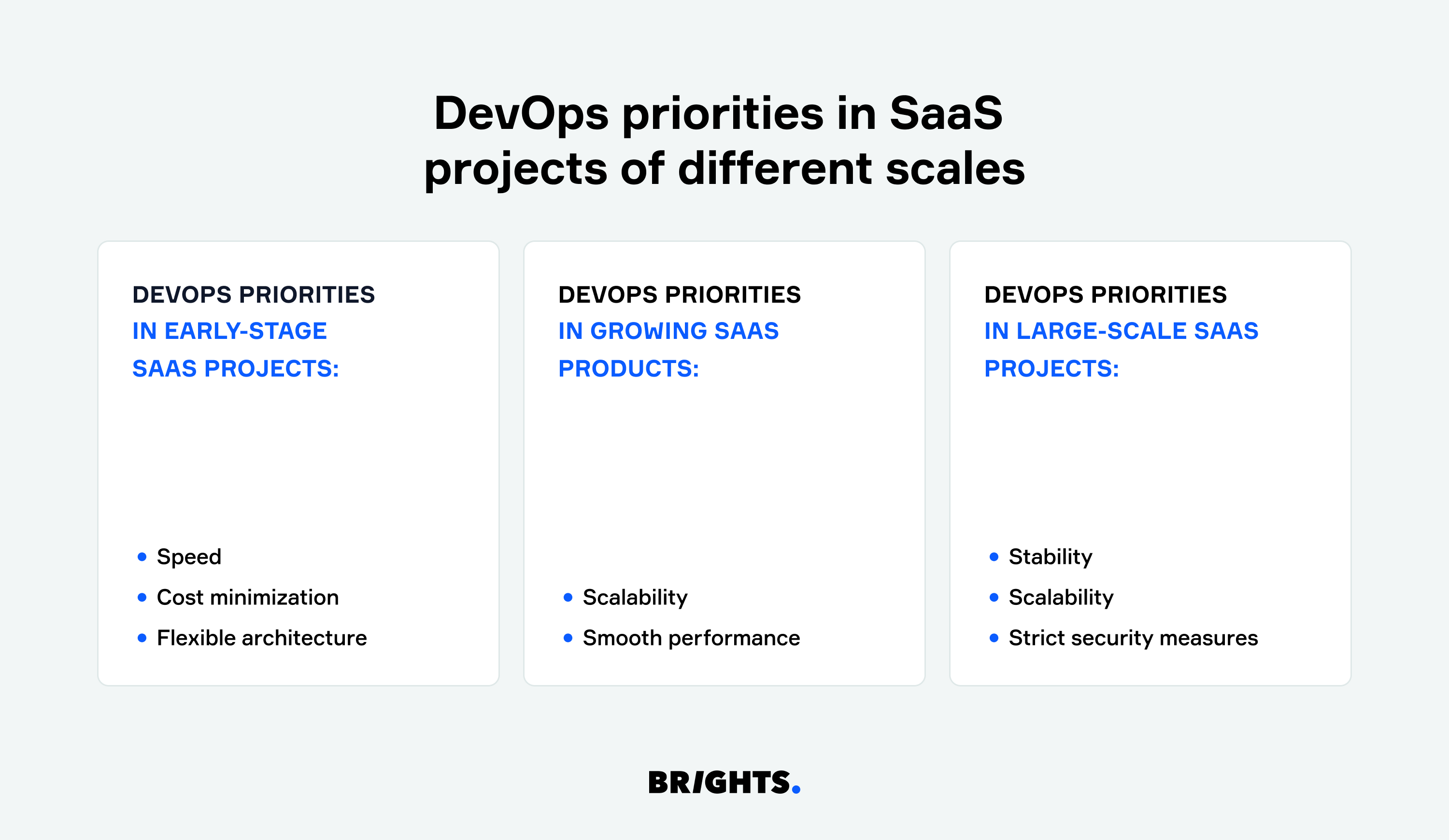
The priorities of a DevOps team depending on the project’s scale
Early-stage SaaS projects
Implementing DevOps early in a SaaS product may seem redundant, but in our experience, it plays an important role in SaaS MVP development. By automating tasks like testing and deployment, the team can focus on building features instead of managing infrastructure.
When teams build a SaaS product with limited time and resources, DevOps focuses on removing operational overhead, like manual server setup, hand-run deployments, and ad-hoc fixes when something breaks after a release. Automating testing and deployment helps you stay focused on feature development instead of infrastructure work. It also prepares the product for the challenges that may appear once early traction turns into real usage.
In early-stage SaaS projects, the DevOps role is narrow and pragmatic. As Brights’ DevOps engineer Yurii K. explains:
“With minimal viable products and early-stage SaaS products, our key task is automated deployment of minimal functionality. At this point, I can single out three priorities: speed, cost minimization, and flexible architecture.
Early-stage SaaS projects prioritize speed. When working on such cases, our DevOps team focuses on setting up the basic infrastructure, which allows us to quickly deploy and update the product. The goal is to minimize setup time and keep processes simple.
At the MVP stage, companies often work with limited resources, so the DevOps team usually relies on cloud-based solutions that are easy to scale and don’t require large infrastructure investments. Services like PaaS help reduce the cost and effort of server configuration.
Flexible architecture also matters early on. It allows teams to make rapid code changes and test new features without introducing the complex processes required in larger products.”
A basic CI/CD pipeline and a lightweight infrastructure setup are usually enough to support early development, says our expert.
Growing SaaS products
Once a product moves beyond early adopters, tolerance for downtime drops quickly. Brights’ experience with scaling SaaS products shows that this is often the point where infrastructure and release processes need to catch up with how the product is being used.
DevOps work at this stage focuses on strengthening the setup so it can handle more traffic and activity without slowing the product down. This is often when teams start looking at SaaS-managed DevOps to take pressure off internal teams without hiring more people.
Deployment speed also starts to matter more. Growing SaaS products are expected to ship improvements regularly, fix issues quickly, and act on user feedback without long release cycles. DevOps teams support that pace by setting up reliable CI/CD pipelines that move changes from development to production with less risk and fewer delays.
SaaS projects of established enterprises
At a large scale, DevOps stops being optional. By this point, workflows are usually deeply interconnected, infrastructure spans multiple environments, and several teams work in parallel on different parts of the product. If this sounds familiar, it’s because most SaaS companies reach this stage with systems that evolved faster than their operational setup.
In these environments, DevOps work focuses on keeping systems stable while supporting ongoing change. As Brights’ DevOps engineer Yurii K. explains:
“On large, enterprise-level SaaS projects, most of our work goes into making CI/CD pipelines reliable, setting up complex orchestration, and managing high workloads. At this scale, stability, scalability, and security all have to work together.”
Security also becomes more demanding. With higher usage and tighter regulatory requirements, infrastructure-level protection can’t be handled manually or in isolation. DevOps teams build security into the setup itself, covering access control, encryption, auditing, and compliance as part of everyday operations.
Yurii K. points out that scale introduces a different class of operational risk:
“As user numbers and system load grow, teams have to think about performance monitoring, load forecasting, and disaster recovery much earlier. We usually set up continuous monitoring so issues are visible as they happen, not after users start reporting them.
Downtime during updates is another big concern at this stage. For enterprise SaaS products, deployments have to be non-disruptive, which is why CI/CD pipelines are designed to support continuous delivery without interrupting users.”
At this level, Brights’ DevOps team typically works with technologies such as Kubernetes, AWS ECS or EKS, Terraform, Ansible, Grafana, and Sentry to support orchestration, automation, and monitoring at scale.
DevOps roles in different SaaS project stages
DevOps supports SaaS projects by helping teams clear delivery bottlenecks, coordinate work more effectively, and ship changes faster as the product grows. To do that, different DevOps roles matter at different stages.
| Role | Responsibility | SaaS development stage |
|---|---|---|
| DevOps evangelist | - Promotes DevOps practices across teams - Helps teams adopt shared workflows - Supports cultural and process change | Relevant at all stages, especially during early adoption and periods of organizational change |
| Code release manager | - Oversees software releases - Manages repositories and release pipelines - Coordinates release timing across teams | Most involved during development and release, and remains important for post-launch updates |
| Automation architect | - Designs CI/CD pipelines - Automates testing and deployments - Reduces manual operational work | Most relevant during development and testing |
| Experience assurance (XA) professional | - Oversees user experience quality across the product - Works with product and design teams on SaaS UX design - Ensures changes don’t degrade usability | Active during testing, pre-launch, and post-launch stages |
| Test engineer | - Writes and runs automated tests - Performs manual testing when needed - Supports bug tracking and resolution | Involved mainly during development and testing |
| Security compliance engineer (SCE) | - Monitors infrastructure and pipeline security - Ensures compliance with regulations - Integrates security checks into CI/CD | Relevant across all stages, with a stronger focus during development, testing, and deployment |
In a DevOps setup, these roles work together so development, deployment, and monitoring don’t drift apart. With a DevOps team in place, launches usually move faster, quality issues get caught earlier, and the whole process feels easier for both the people building the product and the people using it.
Guidelines on introducing DevOps in SaaS projects
Now that we’ve got the role of DevOps for a SaaS company covered, it’s time to get down to implementation. Here are five essential steps to help your SaaS product scale smoothly while keeping performance high.
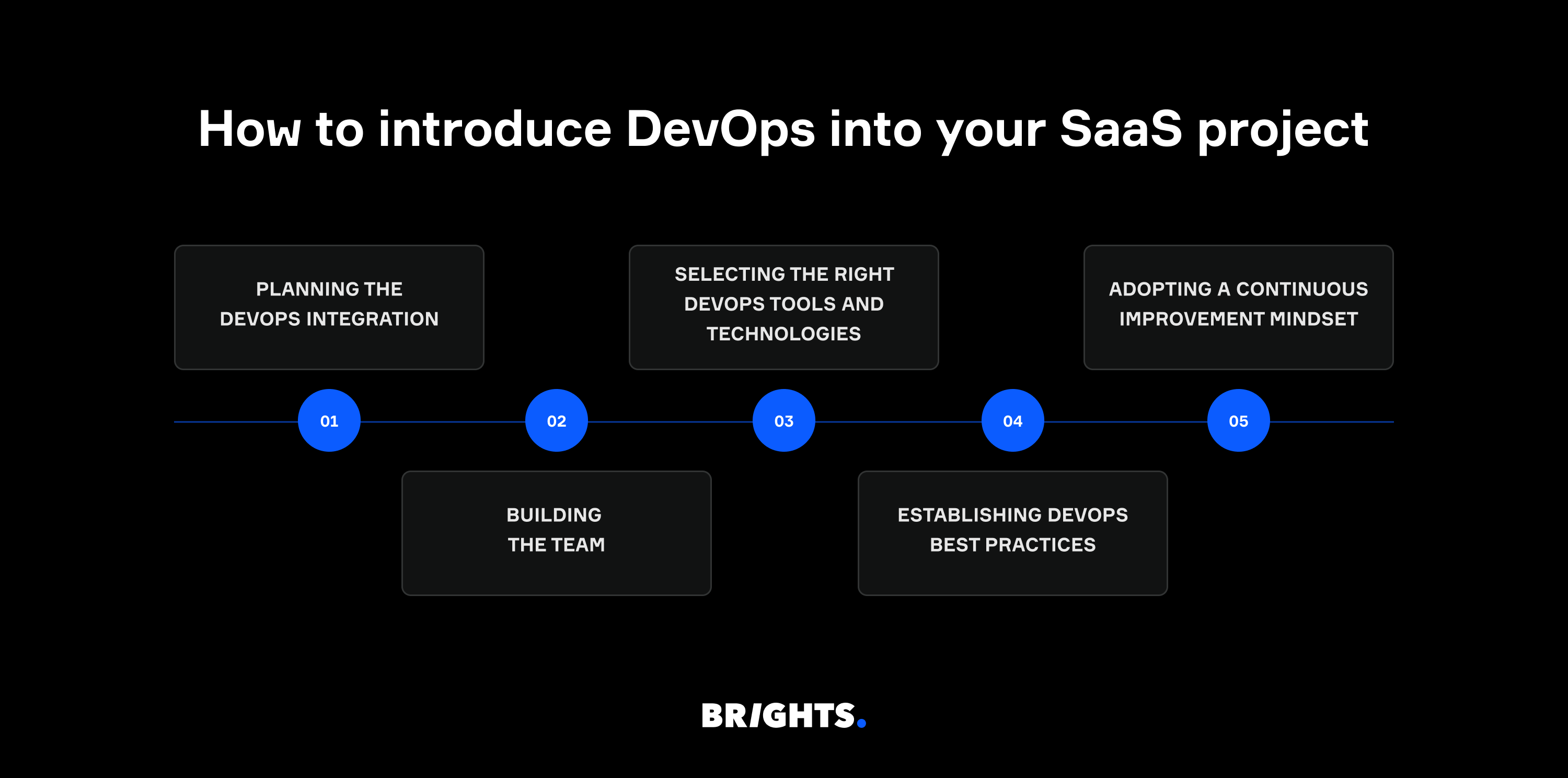
5 steps to introducing DevOps into SaaS projects
Step 1. Planning the DevOps integration
Before introducing DevOps into your project, it helps to be clear about what you want it to achieve. That usually starts with defining business objectives and deciding which key performance indicators (KPIs) matter. Because DevOps influences the entire development process, it also changes how technical teams work together to deliver value.
That’s why many companies involve SaaS consulting services at this stage. They help connect DevOps decisions to business goals and reduce the risk of teams pulling in different directions once implementation begins.
Step 2. Building the team
The traditional approach of isolated teams handling specific tasks won’t cut it in a DevOps-driven SaaS project. So we always recommend aiming for cross-functional teams where developers, QA engineers, and operations staff work together, sharing the responsibility for the code and the infrastructure it runs on. Another tip is to ensure that the roles within your team are flexible and encourage end-to-end product ownership.
Step 3. Selecting the right DevOps tools and technologies
SaaS DevOps automation helps by cutting down manual work and making releases more predictable. Instead of running the same steps by hand every time, DevOps teams use tools to automate builds, tests, and deployments. Here’s a cheat sheet with the tools we typically use at Brights:
| DevOps task | Tools we use |
|---|---|
| Continuous integration and continuous delivery (CI/CD) tools to automate the build, test, and deployment pipelines | Bitbucket, GitHub |
| Cloud platforms and infrastructure tools that provide scalable infrastructure to host, manage, and deploy your SaaS application | AWS, Google Cloud, Microsoft Azure |
| Infrastructure as Code (IaC), which allows you to manage your infrastructure in a version-controlled, repeatable manner for seamless automated scaling | Terraform, AWS CloudFormation |
| Monitoring and logging for real-time insights into your SaaS application’s performance and system health | Grafana, Sentry |
| Containerization and orchestration to package SaaS applications into isolated containers and manage them across distributed environments | Kubernetes |
Find out more about the essential tools for SaaS development in our article about the SaaS technology stack.
Step 4. Establishing DevOps best practices
Alongside tools, teams rely on DevOps SaaS best practices to keep systems improving over time and running reliably in SaaS environments. Teams that operate at scale swear by these best practices:
Automate repeatable work early. Builds, tests, deployments, and infrastructure tasks should run the same way every time, so releases don’t slow down as they become more frequent.
Use delivery metrics to guide improvement. Looking at how often you deploy, how often things break, and how quickly you recover helps teams spot weak points in the delivery process.
Treat infrastructure like code. Versioning infrastructure alongside application code makes changes easier to track and much simpler to roll back.
Build security into the delivery flow. Running security checks inside CI/CD pipelines helps you catch issues early without interrupting development.
Step 5: Adopting a continuous improvement mindset
After the first pipeline is in place, teams usually keep adjusting it based on what happens in production, whether that’s tightening tests, improving monitoring, or changing how work is split when bottlenecks appear.
As SaaS products grow, some teams also bring in AI-assisted tools to support that process. These are often used to sift through logs and metrics, spot unusual behavior earlier (sudden spikes in error rates, memory usage creeping up after deployments, etc.), or highlight patterns that are easy to miss.
We recommend reviewing KPIs like deployment time, recovery time, and system uptime on a regular basis. Post-mortem reviews after incidents or outages also help you spot areas for improvement and keep DevOps processes agile.
Additional tip
When working on SaaS projects, it helps to be aware of the mistakes teams often repeat. As Yurii K. explains, this is something Brights’ DevOps engineers run into:
“One issue I see a lot in SaaS projects is skipping containerization, which makes environments harder to manage and reproduce. Limited automation often comes next, slowing deployments and increasing the chance of errors. Without solid monitoring and logging, teams don’t spot problems until they’ve already escalated.
Scaling can also become a problem, with resources either over-allocated or stretched too thin. And security still gets treated as something to add later, instead of being built into the setup from the start.”
Many of these issues surface only after a product starts scaling, which is why they’re easy to underestimate early on.
How SaaS development costs change with DevOps
If you’ve decided that your SaaS project would benefit from DevOps expertise, the next question is usually about cost. Below is a rough breakdown of what each SaaS development phase looks like when DevOps work is included, based on projects Brights typically works on.
| SaaS development phase | Cost range |
|---|---|
| Discovery phase | $2,000 ‒ $5,000 |
| UI/UX design | $3,000 ‒ $6,000 |
| Front-end and back-end development | $28,000 ‒ $100,000 |
| DevOps services | $1,000 ‒ $2,000 |
| QA Services | $5,000 ‒ $10,000 |
| Post-release maintenance | $10,000 ‒ $30,000 per year |
“Depending on the SaaS app’s complexity, DevOps services will add only about $1,000 ‒ $2,000 to the overall cost of the development project. However, in the long run, it will help you save costs since a well-set-up DevOps process makes it easier for developers to add new components and maintain the codebase.”
— Bohdan K., business analyst at Brights
Tooling costs also need to be considered. Hosting, server maintenance, and cloud subscriptions usually add $1,000–$5,000 per month, based on the product’s scale and setup. For a deeper breakdown, see our article on SaaS development costs.
Why Brights is a reliable DevOps partner for your SaaS
All the insights, tips, and SaaS DevOps practices we shared in this article are based on our experience as a SaaS software development company and outsourcing partner that provides end-to-end DevOps services for cloud-native applications.
But what makes Brights a trustworthy SaaS-focused managed DevOps team? And why should you trust our expertise? Our DevOps specialist singled out six reasons why SaaS businesses of different scales turn to us.
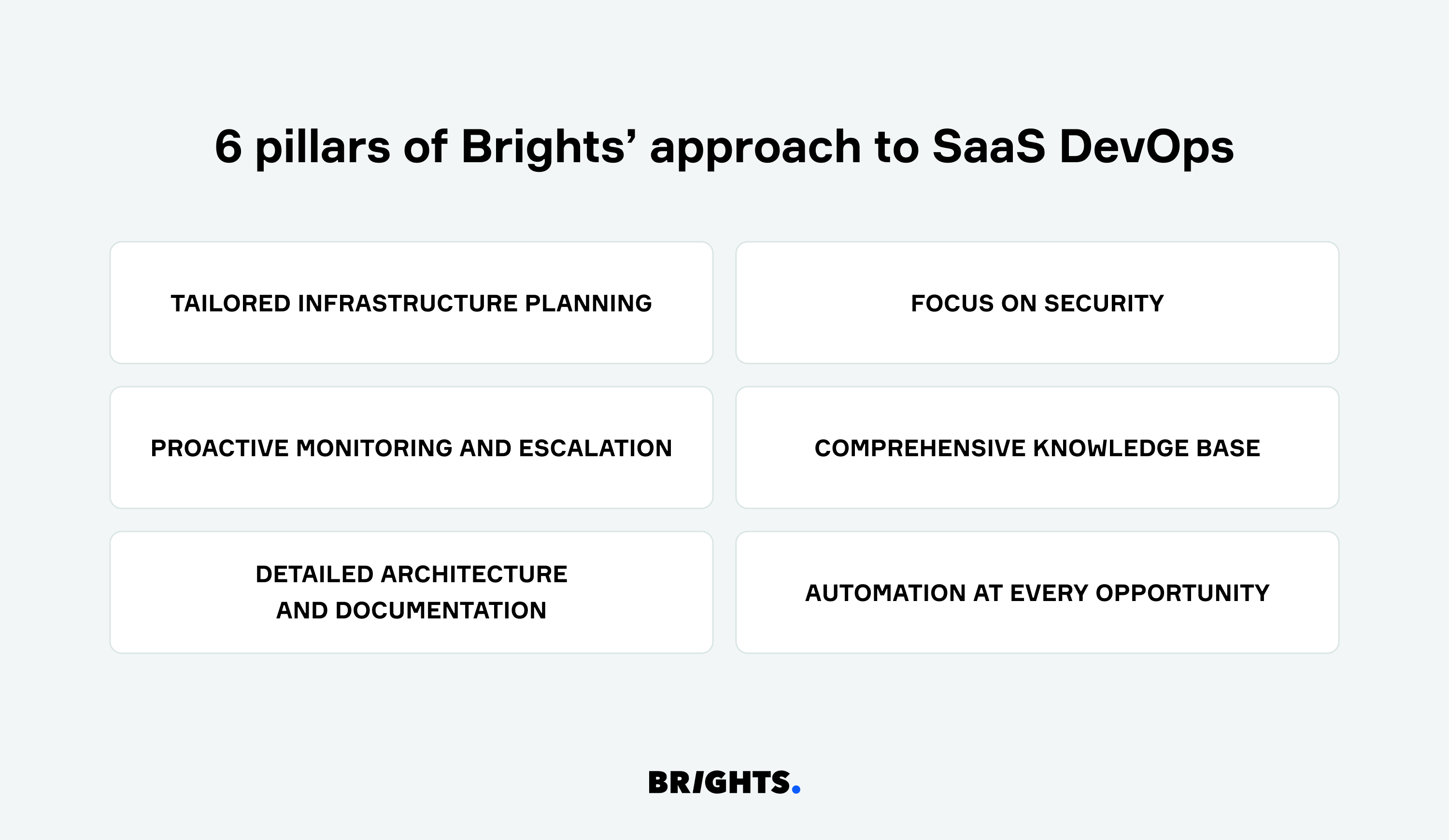
6 reasons why you should trust your SaaS to Brights’ DevOps engineers
Tailored infrastructure planning. At Brights, we don’t believe in guesswork. Before anything is deployed, we look at how the product is expected to be used, where traffic is likely to come from, and which parts of the system may feel pressure first.
Focus on security. Access rules, network boundaries, and automated checks are built into the infrastructure early, so teams aren’t scrambling to fix gaps once the product is already in use.
Proactive monitoring and escalation. We set up monitoring around application health, resource usage, and logs so problems show up quickly. If the primary DevOps engineer doesn’t respond to an alert, it escalates automatically within 15 minutes, so there’s always someone available to step in.
Comprehensive knowledge base. With SaaS products, even short disruptions matter. That’s why we keep a detailed knowledge base and up-to-date documentation, so any DevOps engineer can pick things up without delays when someone is unavailable.
Detailed architecture and documentation. Before deploying the project, we make an architectural diagram and, throughout the deployment process, document every aspect of the project. This makes future updates and support much easier and faster.
Automation where it actually helps. We automate CI/CD pipelines, backups, alerts, and security checks wherever manual work slows teams down or introduces mistakes. The point isn’t to automate everything, but to improve overall efficiency and free up time for more complex tasks.
We don’t expect you to trust this just because we say it works. When you’re choosing an outsourcing team, real projects matter more than promises. That’s why we want to share the story of one of the more demanding DevOps cases we’ve handled.
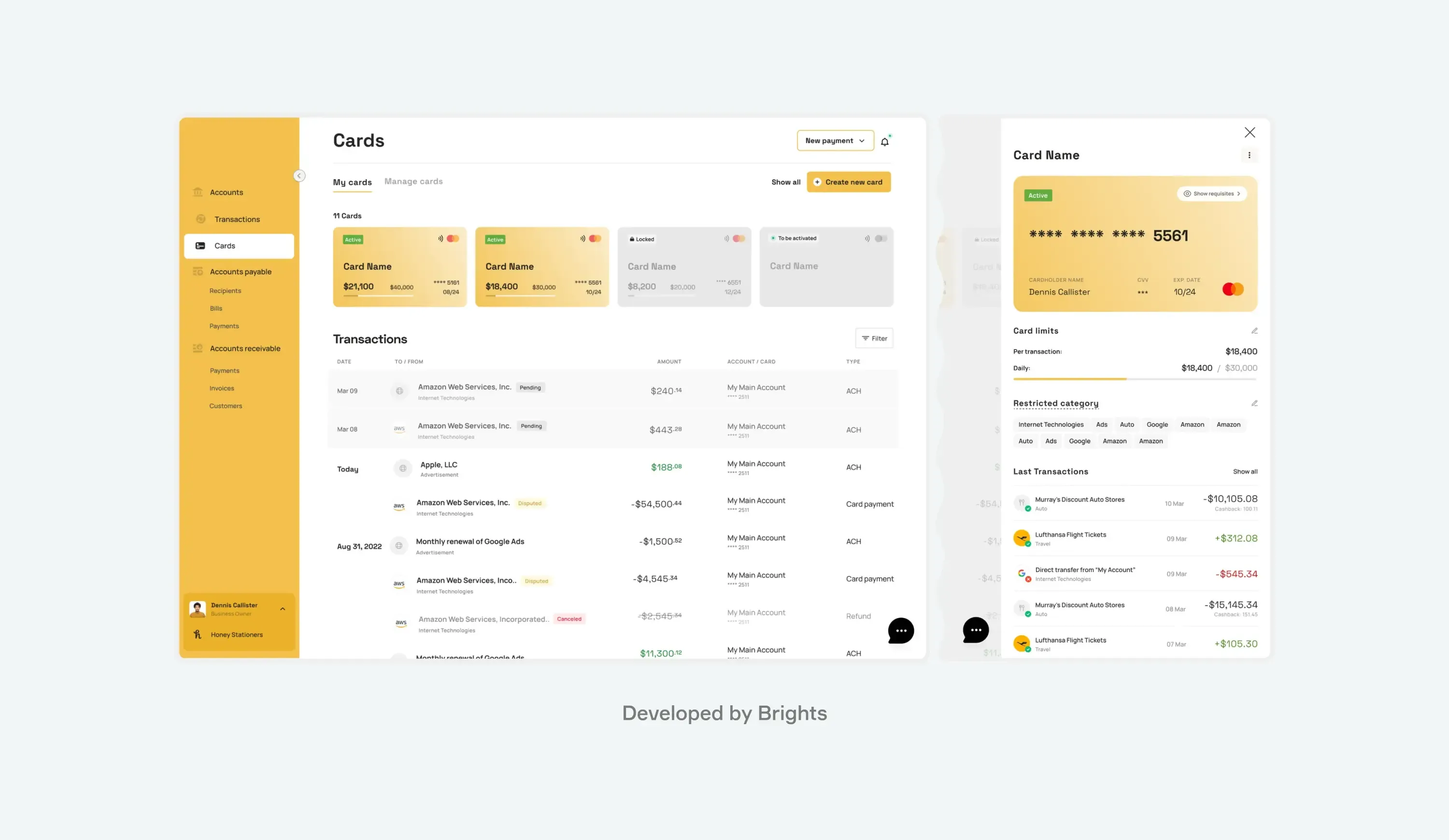
Banking and payment SaaS platform developed by Brights
Brights’ task was to build an intuitive, transparent, free banking and payment SaaS platform that would streamline financial management and accounting for small and medium-sized businesses in one system.
The main challenge was setting up an architecture that could stay stable while handling tens of thousands of transactions each month without delays. Given that the platform covered budgeting, payments, and accounting, security had to be bulletproof.
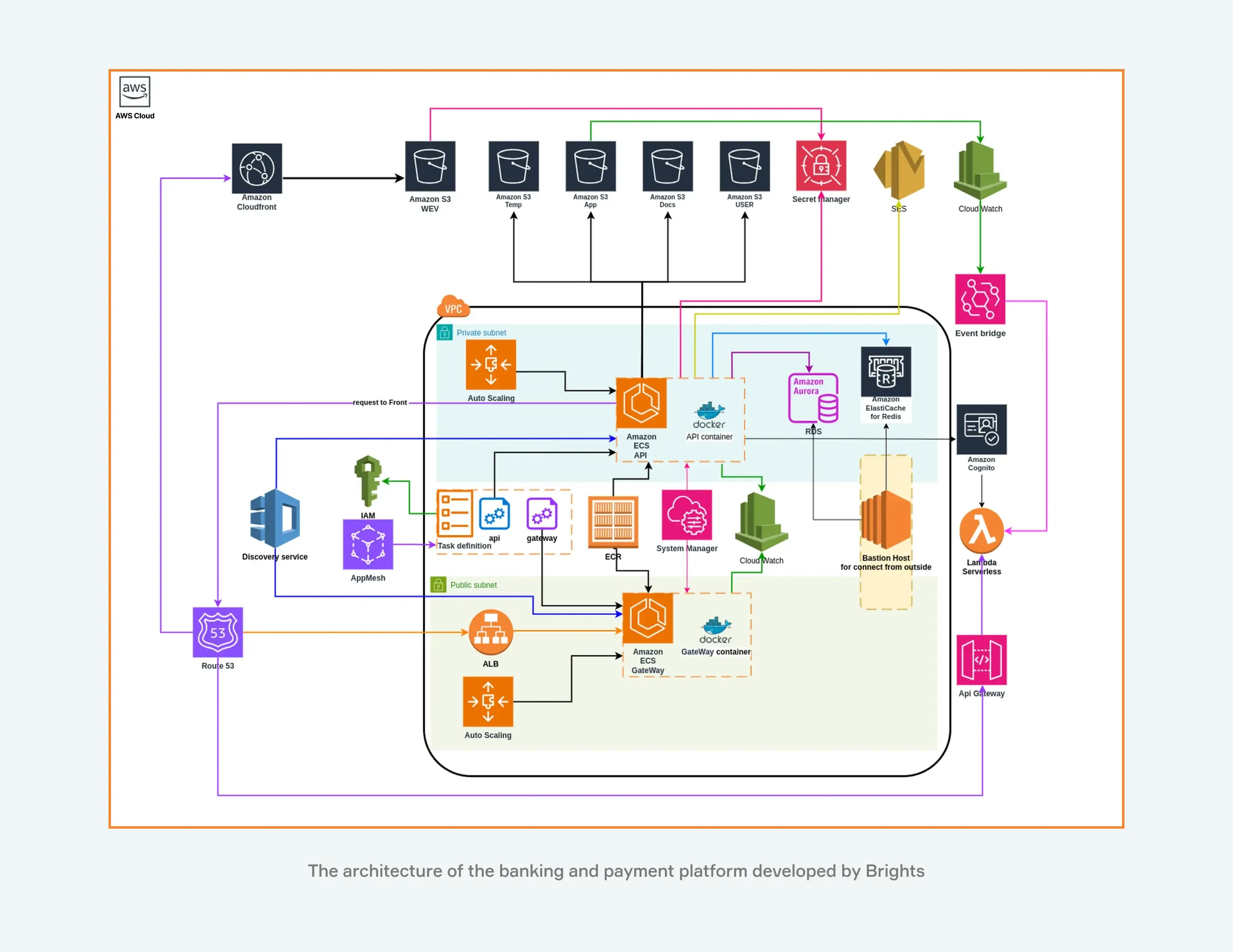
Source: Brights’ case study
We used AWS services like ECS, S3, RDS, ElastiCache, API Gateway, and Lambda to create a scalable infrastructure. However, since the system was so complex, we did run into some issues:
Service configuration and interaction: We put extra effort into managing IAM policies and securing communication between private and public networks. On the network side, we configured secure routing between private subnets and public services using NAT gateways and VPC endpoints.
Monitoring and observability: Brights ensured complete system visibility with CloudWatch and EventBridge, avoiding misconfiguration risks.
Scalability and performance: Our team properly tuned Auto Scaling to balance load, maintain performance, and control costs. We also connected ECS API, RDS, and Redis while maintaining load balance and fault tolerance.
Configuration management: We handled access to secrets using AWS Secret Manager to prevent data leaks.
Deployment: While we initially relied on AWS Lambda, we later shifted to Amazon ECS as the project grew to address increased complexity and resource demands.
This project shows what careful planning and an experienced DevOps team that genuinely cares can handle, even in complex SaaS architectures. Challenges around security, performance, or scale become manageable when they’re addressed early and with attention. It’s a case we’re proud of, and the same DevOps approach can be applied to other SaaS projects as well, no matter how complex they are.
Conclusion
Depending on whether you’re just entering the SaaS market or already managing a fast-growing, successful product, your challenges will differ. Early on, you might struggle with rising infrastructure expenses, and later, you might fail to ensure continuous integration or respond to incidents fast enough. One thing we know for sure is that in all these cases, solid DevOps expertise can save you time and money, while also giving you peace of mind.
We know finding the right fit when looking for DevOps engineers can feel overwhelming. But whether you’re ready to jump right into dealing with the current challenges or are still unsure if you need DevOps support at all, Brights is here to help. Our team can consult with you, take a close look at your needs, and outline a clear DevOps strategy for SaaS that you can build on.
FAQ
Outsourcing DevOps and helpdesk support improves SaaS application stability by connecting infrastructure monitoring with early signals from real user issues. This shortens response times and reduces downtime as usage grows.


