Application Modernization Challenges by Stage: A Field Guide

Most articles about application modernization group common challenges into categories: security, integrations, and skill gaps. While helpful during early research, it’s less useful once your team begins dealing with migration deadlines, budget reviews, and production dependencies.
In fact, application migration can become really messy once engineers start untangling legacy systems, auditing dependencies, or keeping outdated systems running alongside new infrastructure during digital transformation.
Brights has worked on modernization projects across SaaS, fintech, and energy, including zero-downtime cloud migration and modernization of high-load legacy systems. So in this guide, we’ll talk about application modernization challenges stage by stage, including the points where projects usually slow down or technical compromises start piling up.
Key takeaways
Organizations that account for technical debt early in modernization planning see up to 29% higher ROI.
Removing dead code, duplicate logic, and unused features before modernization can cut the project scope by around 30%.
About 85% of applications go through two or three modernization cycles, so early assessment decisions stay with the project long-term.
Teams that postpone data validation until after migration start seeing delays close to go-live.
Cloud costs often exceed the original estimates when parallel environments run longer than planned, workloads migrate without reconfiguration, or teams miss egress fees during planning.
Why most modernization advice fails the people running the project
Problems identified during assessment often differ from the constraints teams encounter during migration. A portfolio review can look manageable until engineers discover that a payment service depends on 47 undocumented connections across internal tools, databases, and third-party services.
Red Hat’s State of Application Modernization report reflects the same pattern. The top challenges organizations report are:
Legacy system complexity (48%)
Competing priorities (42%)
Choosing the right modernization approach (41%)
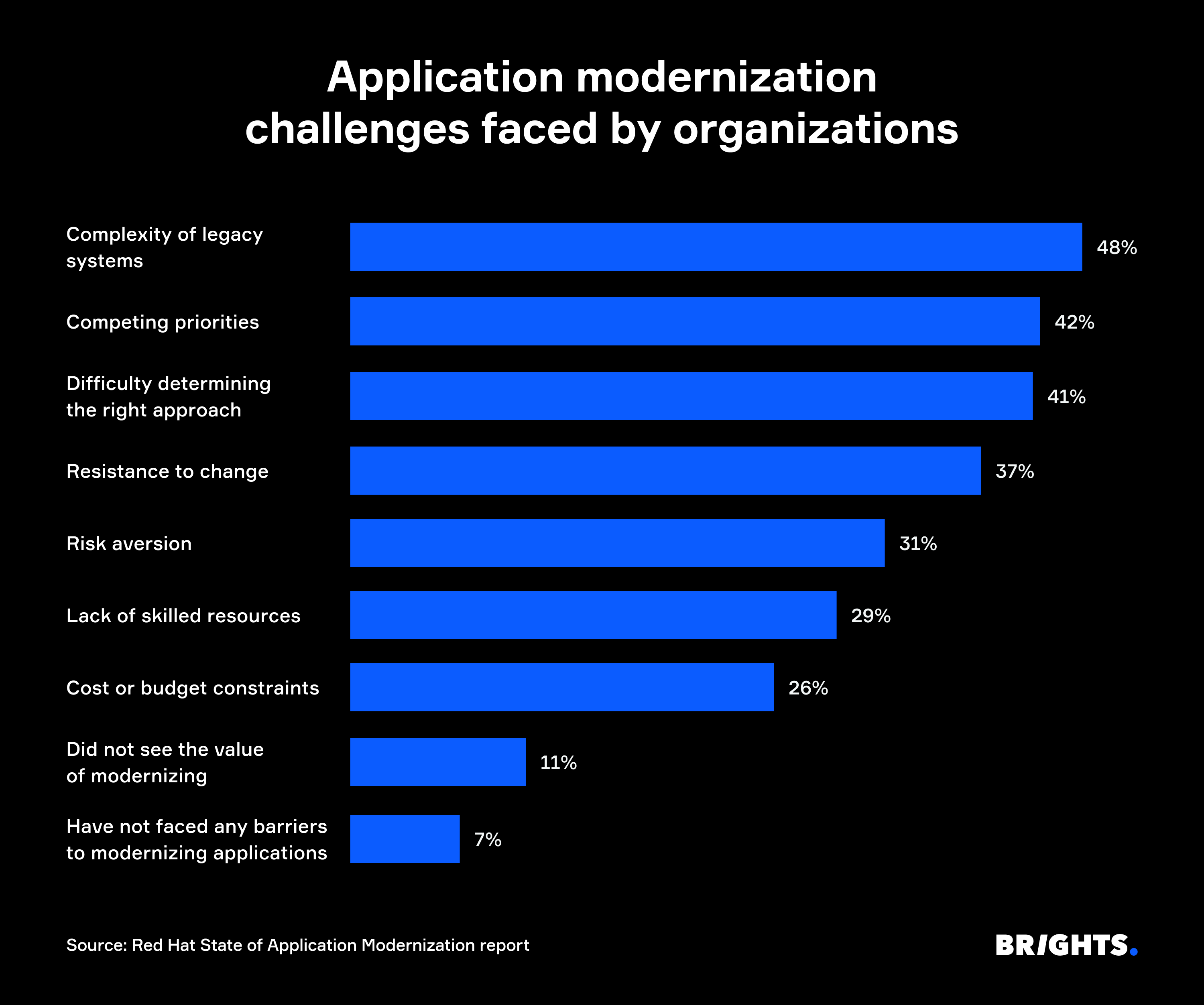
These numbers change depending on the stage of the project and the systems involved. And that’s why successful application modernization efforts are usually managed stage by stage.
Stage 1. Assessment: Challenges that stall the project early
Many legacy app modernization challenges begin during assessment, when teams define scope, budgets, timelines, and migration priorities.
You don’t fully know what’s running in production
It’s common for companies to kick off application modernization with incomplete system inventories. Years of patches, acquisitions, and undocumented dependencies leave production environments far more connected than architecture diagrams suggest.
However, you can reduce the effective project scope by around 30% by removing dead, duplicated, and low-value code before modernization, according to IBM.
Different teams expect different outcomes
Red Hat found that organizations use “application modernization” to describe at least a dozen different initiatives, including cloud migration, containerization, and CI/CD improvements.
Engineering may focus on architecture and technical debt. Finance often cares more about retiring outdated systems and reducing infrastructure costs. Product teams usually expect faster delivery. So your teams need to agree on the scope early.
Some systems should stay untouched
The same research from Red Hat shows that 85% of legacy applications go through two or three modernization steps instead of one large refactor. That makes early retention decisions much more important. Keeping the wrong system in the program can continue affecting delivery timelines and modernization costs for years.
Decision trigger. Pause before planning if:
The inventory hasn’t been validated against production logs, dependencies, and actual usage.
Stakeholders define success differently: cost reduction, faster delivery, architecture cleanup, or retirement of outdated systems.
The portfolio still includes every legacy application by default, with no clear retire/replace/modernize decision.
Stage 2. Planning: Challenges that wreck the roadmap
Planning turns assessment findings into budgets, timelines, staffing plans, and architecture decisions. Most modernization projects start running into the following issues at this stage.
The team picks a stack that it can’t comfortably operate
Teams replacing legacy systems sometimes choose tools based on market popularity instead of operational fit. A few years later, the new platform starts creating the same maintenance pressure as the old one. For instance, microservices increase orchestration complexity, while Kubernetes requires DevOps practices that the team may still be building.
The business case leaves out technical debt
IBM found that companies accounting for tech debt during modernization planning expect up to 29% higher returns. At the same time, projects that ignore those costs often lose 18% to 29% of the expected ROI once teams begin fixing hidden dependencies, outdated code, and delivery delays mid-project.
The timeline comes from the deadline
A launch date can guide planning, but it can’t replace the estimate. Red Hat discovered that companies expect to modernize 51% of custom applications within a year, while 21% estimate timelines longer than two years.
A one-year target may sound reasonable during planning, but older applications, shared infrastructure, and undocumented dependencies often extend the timeline once migration work begins.
Decision trigger. Pause before committing to the roadmap if:
The stack decision has no clear operating model behind it: who manages it, monitors it, and responds when it breaks.
The business case counts migration costs but leaves technical debt remediation outside the financial model.
The timeline has no proof-of-concept, buffer for dependency discovery, or agreed rescoping point.
Stage 3. Execution: Challenges that surface once work begins
Execution exposes the issues that assessment and planning missed. Teams usually encounter them after timelines, budgets, and delivery expectations are already locked in.
Technical debt starts slowing down delivery
Tech debt often becomes visible only after engineers begin changing production code. A module that looked isolated during assessment turns out to depend on undocumented services, shared databases, or outdated tooling. Deprecated dependencies, dead code, and tightly coupled components quickly expand the scope of work, forcing teams to revise estimates and delivery timelines mid-project.
The team is learning while migrating
Robert Half found that 72% of technology leaders report a skills gap within their department, while 77% say the impact has increased year over year. Modernization projects often run into the same issue once engineers begin working with unfamiliar infrastructure and tooling in production.
The pressure usually increases when the same team also handles production support, incident response, and migration work at the same time.
Data problems arise close to cutover
Many application modernization performance challenges tied to data migration begin once migrated systems start processing real production data, exposing incompatible formats, missing relationships, and duplicated records accumulated across years of changes inside legacy systems.
Compliance requirements arrive too late
SOC 2, GDPR, and industry regulations affect data storage, access controls, and infrastructure design early in the project. If those requirements are reviewed after architecture decisions are already implemented, teams often end up rebuilding parts of the deployment flow, permission model, or service structure during execution.
Decision trigger. Pause before continuing execution if:
Newly discovered technical debt is being deferred without a revised scope, owner, or budget.
The same engineers are handling modernization, production support, and incident response, with no protected delivery capacity.
Data validation has no owner, test plan, or cutover criteria.
Compliance requirements are changing approved architecture decisions during implementation.
Stage 4. Post-go-live: Challenges that hit after launch
Go-live ends the migration phase, but real production traffic and day-to-day usage often expose issues that never appeared during implementation.
Cultural resistance and tool reversion
A modernized system delivers value only after business teams start relying on it in day-to-day work. During application modernization, workflows left outside planning discussions often return later as spreadsheets, email threads, or older tools still running in parallel. That’s usually where customer experience improvements start slowing down: the platform changed, but the operational process around it stayed the same.
Cloud costs rise after migration
Post-migration costs often exceed the original estimates in cloud migration projects, especially when parallel environments stay active longer than planned, or workloads move into production without cost reconfiguration.
The 2025 CloudBees DevOps Migration Index reported average cost overruns of 18%. Additionally, 57% of organizations spent more than $1 million on platform migrations during the previous year.
Modernization isn't a project but a capability
Some companies treat modernization as a one-time migration project. But Microsoft’s application modernization lifecycle guidance describes application modernization as an ongoing cycle of assessment, planning, execution, and improvement. Even modernized legacy applications continue accumulating technical debt over time and still require maintenance, monitoring, and infrastructure updates.
Decision trigger. Pause before treating the migration as finished if:
Business teams still rely on older workflows, and nobody owns adoption or retraining.
Cloud costs exceed the planned run rate, but workload rightsizing and cost ownership remain unclear.
No team owns backlog cleanup, monitoring, CI/CD maintenance, and future modernization decisions after go-live.
How Brights approaches modernization
Brights has run modernization programs across energy, insurech, fintech, SaaS, and enterprise systems, including projects where production systems needed to stay operational throughout migration and infrastructure changes.
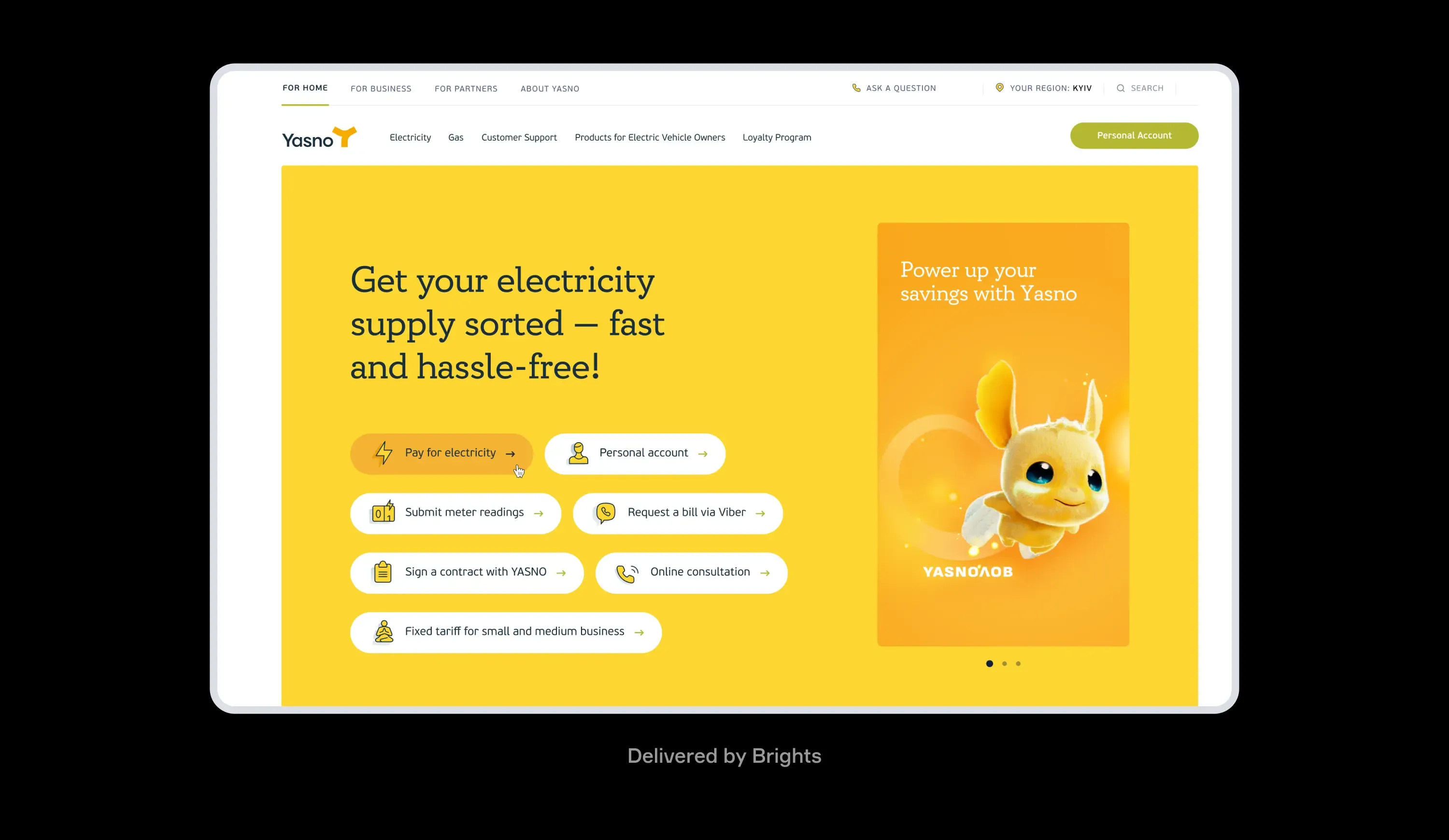
Yasno needed to handle traffic spikes reaching up to 2 million users per hour during power outage schedule updates. The existing monolithic architecture could no longer handle the load, so Brights rebuilt the platform while it stayed operational:
Splitting the monolithic backend into separate services
Rebuilding the Kubernetes cluster with updated balancing and resource allocation
Configuring automatic scaling for peak traffic periods
As a result, API throughput increased tenfold.
Meanwhile, renovero, Switzerland's leading craftspeople marketplace, approached Brights with a different modernization challenge: an outdated interface, a slow content management workflow, and a request flow that had become difficult for users to navigate.
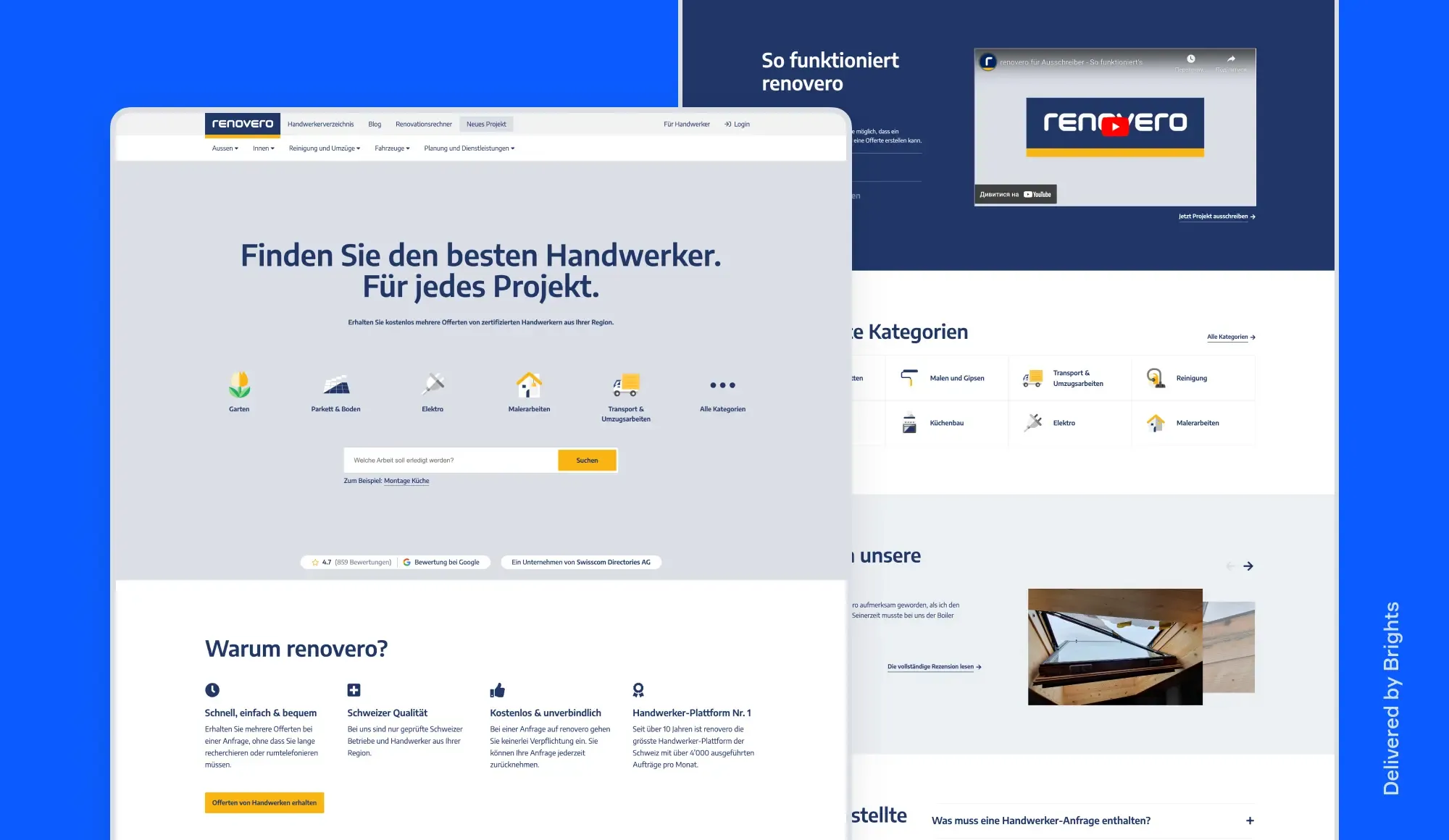
We started with a technical and UX audit before moving into platform modernization, including:
Simplifying navigation and reducing friction in the request flow
Reworking key pages and improving the overall UX structure
Updating the CMS workflow and adding multilingual content support through DeepL integration
The modernization also included AI-assisted request categorization to help users describe tasks more accurately and reach the right service providers faster.
Across these projects, Brights scoped security and compliance requirements before migration work began. Our team also has experience developing SOC 2 Type 2 compliant applications and operates under ISO/IEC 27001-certified security practices.
Wrapping up
Most application modernization problems start appearing long before migration work begins. Weak dependency mapping affects planning. Unrealistic timelines create pressure during execution. Post-launch issues often trace back to decisions made during assessment or rollout preparation.
The benefits of application modernization become easier to sustain when migration decisions reflect what is already running in production and how the platform is used day to day.
Brights starts modernization projects with production systems, operational constraints, and migration risks already on the table before implementation begins.
FAQ.
Modernization makes sense when the application's core logic is still sound, but the infrastructure around it is the problem. When the codebase is too fragile to build on or when an off-the-shelf product covers the use case at a lower cost, replacement is worth serious consideration.


