Web Accessibility Audit: A Practical Guide for Product Owners Facing ADA and EAA Requirements

Accessibility problems often go unnoticed. Even well-designed products can have hidden barriers in key areas like signup, checkout, and booking. For example, a button without a label can prevent someone using a screen reader from completing a payment, and light-gray pricing text can make it hard for customers with low vision to see prices. For businesses, these issues can lead to lost sales and compliance risks, which are increasing as the European Accessibility Act is enforced and US courts handle thousands of accessibility lawsuits each year.
The flip side is a sizable market. More than one in four adults in the US and the EU live with a disability, so at least one in five of your potential customers needs an interface that works with a keyboard, a screen reader, or enlarged text. When a competitor's checkout fails them, an accessible one wins the sale. The same fixes, such as clear labels, readable contrast, and predictable navigation, also make the product easier for everyone else to use.
A web accessibility audit helps you find these barriers before your customers or regulators do. Experts check your product using the Web Content Accessibility Guidelines (WCAG) and record each issue, such as missing alt text, low color contrast, or forms that can't be completed with a keyboard. They also note how serious each problem is and suggest how to fix it.
At Brights, we include accessibility reviews in our UX audits, and our team can both identify issues and update your product to ensure it works well with assistive technology. In the sections below, we explain what an audit covers, where automated tools fall short and human experts step in, what the process costs, and how to get your team ready to act on the findings.
Key takeaways
Accessibility opens your product to at least one in five potential customers, including people who find it hard to read or focus and those on slow connections, not only people with low vision.
Almost every website has accessibility issues, including the most visited ones.
A web accessibility audit evaluates your site or app against WCAG, typically version 2.1 or 2.2 at level AA, and produces a prioritized list of fixes.
Automated scans find a large share of issues quickly, but a person still has to judge whether alt text makes sense or a checkout flow works with a keyboard.
Scope drives the budget. Manual audits for small sites typically start around $1,500, while complex products run well into five figures.
Accessibility widgets and overlays offer no legal shield: companies using them still get sued.
Results fade as the product changes, so retests and automated checks in the release pipeline keep the gains from slipping.
Why accessibility became a business risk
The size of the audience
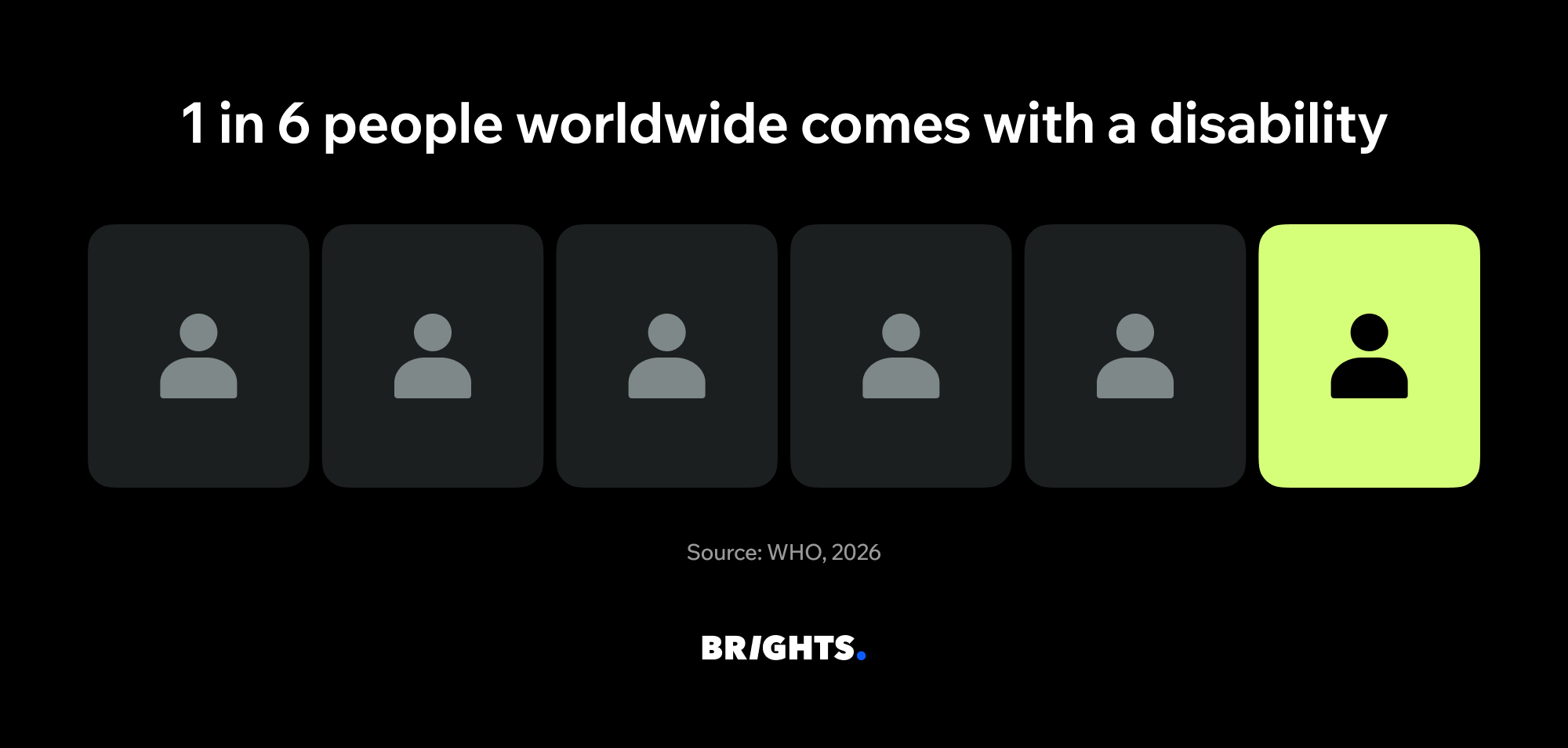
The World Health Organization estimates that 1.3 billion people, about one in six, live with a significant disability. Add older users whose eyesight is changing and anyone reading a phone in bright sunlight, and the group affected by poor contrast or mouse-only controls grows well past that number.
However, vision is only part of the picture. People with dyslexia find dense text hard to read, people with ADHD lose focus when the screen keeps moving, people with vestibular disorders can feel dizzy from animation, and anyone on a weak mobile connection waits for heavy pages to load.
That's why our accessibility work at Brights now goes beyond contrast and screen reader support. We also design and build user-controlled modes: a grayscale view, a switch that stops animations, a dyslexia-friendly font, and a text-only view that loads without images. Unlike overlay widgets, these modes are part of the product's own code and rely on the same accessible components as the rest of the interface.
Regulation
United States. Businesses open to the public are subject to website claims under the Americans with Disabilities Act (ADA). Website accessibility lawsuits grew by about a quarter in 2025, and ecommerce companies receive most of them. Government websites face their own deadline: the Department of Justice's Title II rule requires state and local governments to meet WCAG 2.1 AA by April 2027 or April 2028, depending on population size.
European Union. The European Accessibility Act covers consumer-facing digital services sold in EU member states, including e-commerce, banking, and transport booking, wherever the company is based. Products sold only to other businesses fall outside its scope. The technical benchmark is EN 301 549, which incorporates WCAG 2.1 AA, and an updated version built on WCAG 2.2 is in drafting.
What a web accessibility audit checks
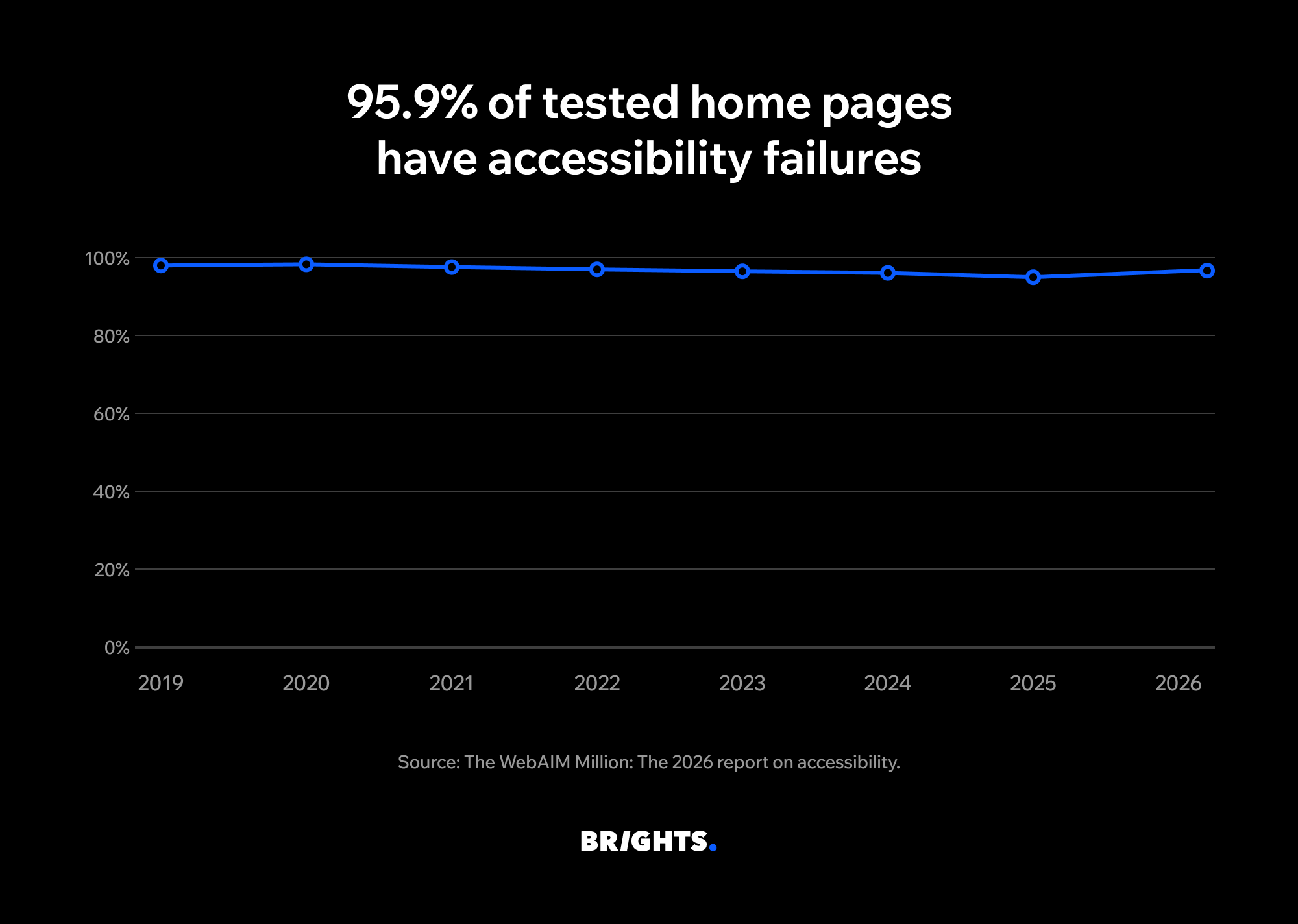
A web accessibility audit compares your website or web application against a defined standard and documents every place where people with disabilities can't perceive, operate, or understand the interface. In practice, that standard is almost always the Web Content Accessibility Guidelines (WCAG), published by the W3C. According to WebAIM report, 95.9% of tested home pages have accessibility failures.
The standard and the level
WCAG has three conformance levels: A, AA, and AAA. Laws in the US and the EU point to level AA, so that's the usual target. The version is where teams have a choice. WCAG 2.1 AA is the legal baseline in most current regulations, while WCAG 2.2 adds nine success criteria, including rules on visible keyboard focus and accessible authentication. Auditing against 2.2 AA covers today's requirements and prepares you for the EN 301 549 update.
All versions rest on the same four POUR principles: content must be perceivable, operable, understandable, and robust.
The barriers that show up most often
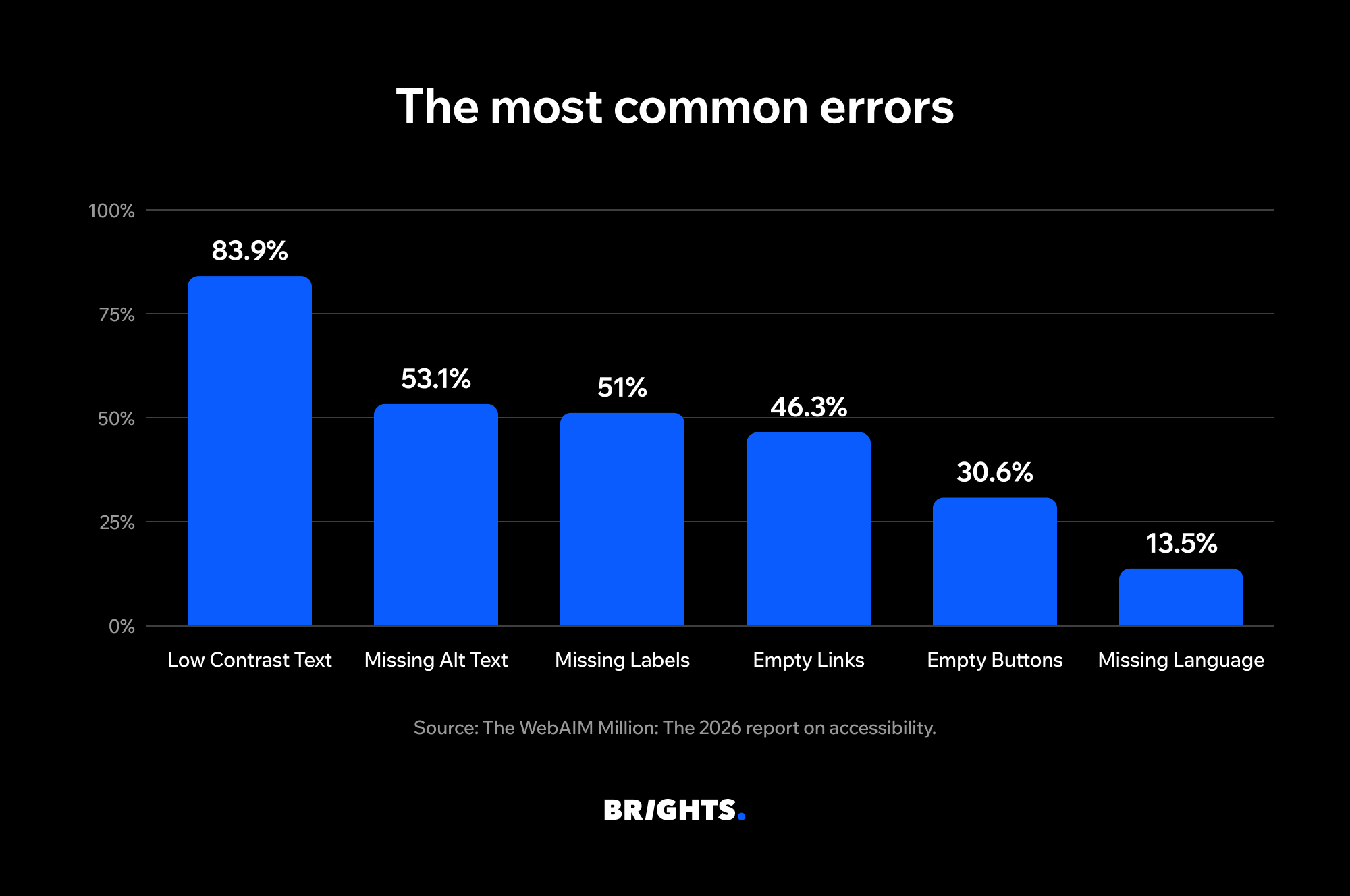
Most sites fail in the same places. The WebAIM Million finds the same issues at the top of its list year after year:
Low-contrast text
Images without alternative text
Form inputs without labels
Empty links and buttons
Missing page language
Those are the easy finds. A thorough audit also covers what scanners can't judge: whether keyboard focus moves in a logical order, whether an error message tells users how to correct a field, whether a modal traps focus, and whether a screen reader announces changes like an updated cart total.
Many barriers also start in the design rather than in the code, so a complete audit reviews the interface itself:
Responsive layout. Content should stay usable on a 320px-wide screen and with text zoomed to 200%, without horizontal scrolling or overlapping elements. On very wide screens, text shouldn't stretch into lines too long to follow.
Component states. Buttons, links, and inputs need visible hover, focus, active, selected, and disabled states, so users always know where they are and what they can interact with.
Target sizes. WCAG 2.2 sets a minimum of 24 by 24 CSS pixels for clickable elements, and Apple and Google recommend 44 to 48 pixels for touch. A 5-pixel icon button fails people with hand tremors and anyone tapping on a phone.
Statuses, hints, and errors. Each message should combine text with a visual cue. A red border alone means nothing to a colorblind user, and an error message without visual emphasis is easy to overlook.
Pages are only part of the picture. PDFs, videos, email templates, and mobile apps can all carry barriers, so decide early which digital assets belong in scope.
What you get at the end
When a company commissions a web accessibility audit, it should receive a report listing each issue with its location, the WCAG success criterion it violates, a severity rating, and a recommended fix a developer can act on. Many auditors also prepare an Accessibility Conformance Report (ACR), often based on the VPAT template, which US procurement teams frequently request. In the EU, audit results feed the accessibility statement the EAA expects businesses to publish.
A word on certification. The W3C doesn't certify websites, and no other official body does either. Certification exists for people: the International Association of Accessibility Professionals (IAAP) offers credentials such as CPACC and WAS. If a vendor promises your site a "WCAG certificate," ask what the document contains and who tested the product.
How automated and manual testing split the work
Automated tools scan code against a rule set and report violations in seconds. They’re fast and cheap enough to run on every release. How much they find is debated, with estimates ranging from about a third of all issues to more than half. The spread comes down to counting: a handful of common problems, like contrast and missing labels, account for most issues on a typical site, and scanners detect them reliably.
Reliable detection only means the rule was applied, and the rule itself has limits. Most scanners check contrast with the WCAG 2 formula from 2008, which compares the relative brightness of two colors and nothing more. It gives the same result for dark text on a light background and light text on a dark one. Font size counts only as a single cutoff: large text needs 3:1 and everything else 4.5:1, whatever the weight. Human vision is less tidy. In a dark theme, gray text on a near-black background can pass and still be hard to read, and a Light 300 font at 14px can hit 4.5:1 and still look faint.
Newer models such as APCA (Accessible Perceptual Contrast Algorithm) account for text polarity, size, and weight, so they catch these cases. They can’t replace WCAG 2 yet. The European Accessibility Act, in force since June 2025, still builds on WCAG 2 criteria. APCA was also removed from the WCAG 3 draft, so the contrast method in the next standard is still undecided. A practical approach is to check both: WCAG 2 to pass compliance checks, and APCA to make sure people can comfortably read the text.
Contrast at least has a formula. Judging meaning has none, and that’s where scanners fall short. A tool can confirm that an image has alt text, but it has no way to know whether “image123.png” describes a product photo. Buttons are easy to detect, too. Whether a keyboard user can get through checkout is another matter, and only a person testing the flow will notice when focus disappears behind a pop-up. That judgment comes from a manual audit, where specialists use assistive technology to complete real user tasks.
| Aspect | Automated scan | Manual audit |
|---|---|---|
| What it finds | Rule-based issues: contrast, missing alt text, missing labels, empty links | Issues that need judgment: meaningful alt text, focus order, usable flows, clear error messages, responsive layout, component states, target sizes |
| Speed | Minutes | Days to weeks, depending on scope |
| Cost | Free tools to a few hundred dollars per month | Typically from $1,500 for a small site |
| How often | On every build | Before launch, after major redesigns, or once a year |
| Assistive technology | Not used | Screen readers, keyboard-only use, zoom, voice control |
| Best for | Catching regressions and quick wins | Conformance reports, legal documentation, complex flows |
Web accessibility audit tools your team can start with
A first read on your site costs nothing. These free tools cover most of the automated side and part of the manual one:
axe DevTools, a browser extension built on the open-source axe-core engine, which flags WCAG violations and explains how to fix each one
WAVE from WebAIM, which places icons directly on the page so designers can see where problems sit
Lighthouse, built into Chrome DevTools, which reports an accessibility score next to performance checks
Colour Contrast Analyser from TPGi, which checks text and background color pairs, including those inside images
NVDA, VoiceOver, and TalkBack, free screen readers for Windows, Apple devices, and Android
Keep in mind what each tool is for. Web accessibility audit tools tell developers where the code breaks a rule. To learn whether a blind user can book an appointment or pay an invoice, someone has to try it with a screen reader.
One category deserves caution: overlay widgets that promise compliance with a single line of code. Companies that rely on them are still sued regularly, because the widgets leave the underlying code as it was.
How a website accessibility audit runs, step by step
Vendors name their stages differently, but a solid website accessibility audit tends to follow the same sequence.
Agree on scope and standard. Auditors usually test a representative sample: each unique template, plus the flows that drive revenue, such as signup, checkout, or booking.
Run automated scans. A full-site crawl surfaces repetitive issues and shows which templates produce the most errors.
Test manually with assistive technology. QA engineers and developers go through each flow with a keyboard alone, then with screen readers, magnification, and high-contrast settings. Designers review the same flows at different screen widths and check component states, target sizes, and how messages appear.
Involve users with disabilities. Sessions with people who use assistive technology every day reveal friction that conformance testing can miss. Not every audit includes this step, so check the quote.
Prioritize findings. Each issue gets a severity rating based on how badly it blocks users and how many pages it affects, so developers start with the blockers.
Fix and retest. After remediation, auditors verify the fixes. Ask whether a retest round is included in the price.
Document. The final package may include the issue report, an ACR, and text for your accessibility statement.
How to prepare for a website accessibility audit
Preparation decides how much value you get from the audit budget. Run through this checklist before the auditors start:
List the user journeys that matter most to revenue and to users, such as registration, search, checkout, or booking
Inventory your digital assets, including templates, PDFs, videos, embedded third-party widgets, and mobile apps, and mark which ones are in scope
Choose the standard: WCAG 2.2 AA for most products, or 2.1 AA if a contract or regulation names it
Collect what you already have, from previous audit reports and design system documentation to accessibility complaints in support tickets
Name one owner who can answer auditors' questions and make scope decisions quickly
Set up access with a staging environment, test accounts with realistic data, and credentials for gated areas
Agree on how findings will reach developers, whether as a spreadsheet, Jira tickets, or both
After the audit: keeping accessibility from slipping
Every release can bring issues back. A new banner with light-gray text or an icon button without a label is enough to undo part of the work. These habits help the results last:
Add accessibility testing to your CI pipeline. axe-core and similar libraries can fail a build when a new violation appears.
Fix issues at the component level. When your design system's buttons, inputs, and modals are accessible, every screen that uses them inherits the fix.
Train designers and developers on the audit findings. Repeat issues usually point to a gap in shared knowledge, and a short session closes it faster than ticket-by-ticket fixes.
Schedule the next round. Run a web accessibility audit at least once a year and after major redesigns, and update your accessibility statement when the product changes.
Summing up
A web accessibility audit gives you an honest picture of where your product shuts people out and an ordered list of what to fix first. The strongest results come from pairing automated tools with manual testing and from scoping the audit around the flows your users and your revenue depend on. Once accessibility becomes part of how the product is designed and released, new features no longer reopen old problems.
References
The WebAIM Million: The 2026 report on the accessibility of the top 1,000,000 home pages.
UsableNet. 2025 Year-End Digital Accessibility Lawsuit Report.
Seyfarth Shaw, 2025 ADA Title III lawsuit data, as summarized by Be Accessible.
European Union. Directive (EU) 2019/882 (European Accessibility Act)
WebAbility. WCAG Audit Cost: A 2026 Budgeting Guide for Leaders.
FAQ.
Once a year is a sensible baseline for most products, plus an audit before launch and after any major redesign. Between audits, automated checks in the release pipeline catch regressions early.
Not on their own. They find a large share of issues, especially contrast, labels, and alt text, but conformance also depends on things only people can judge, such as focus order and whether a flow works with a screen reader.
The W3C doesn't certify sites, and no official body issues website certification. Auditors provide reports and conformance documents such as an ACR, while IAAP certification applies to accessibility professionals.
WCAG 2.2 AA works for most products. Current US and EU rules reference WCAG 2.1 AA, and since 2.2 includes all of 2.1 except one removed criterion, auditing against 2.2 covers today's requirements and the upcoming EN 301 549 update.
They don't. Lawsuits keep naming companies that have these widgets installed, so an overlay can't replace fixing the code.


