Mobile App Engagement: What App Fatigue Means for Product Retention

This article is written in collaboration with Hannah Hicklen, Content Marketing Manager at Clutch
Every year, businesses pour their budgets into mobile app development, and every year, a quieter counter-trend erodes the investment — app fatigue. With too many digital applications pulling them in countless directions, users are rapidly growing frustrated and disengaged.
Now, many people are hesitant to download a new app and are quick to uninstall it. Push notifications get silenced, storage warnings trigger purges, and the home screen real estate that once felt infinite now feels fiercely guarded.
Consumers aren't anti-app, exactly. They're anti-another app — another login, another notification channel, another thing competing for the shrinking sliver of attention they haven't already pledged elsewhere.
With this in mind, earning a return on your investment takes more than just launching an app. It means capturing your audience's attention and retaining them long after the first download.
Installed apps vs. apps that people want to use every day
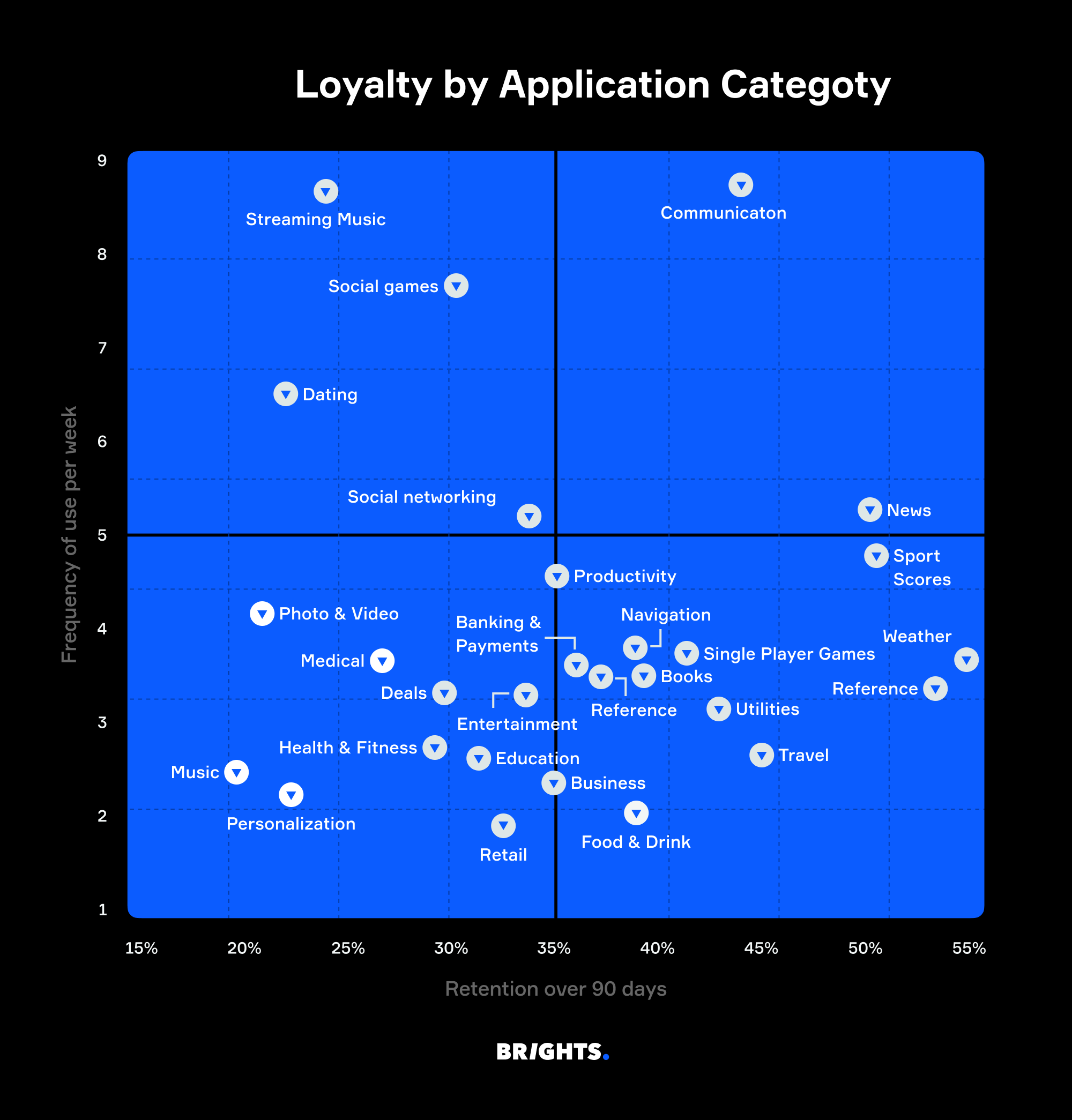
Most users have dozens of apps on their smartphones, but they actively use only 9 or 10 every day and only about 30 each month. Habit, not novelty, drives app usage. According to a new survey from Clutch, about 77% of users say they’ll keep an app installed if it’s part of their daily or weekly routine.
In other words, if your app doesn't become a habit within the first week, it's on borrowed time.
User willingness to install apps just to try them is fading. Now, nearly half of users only download apps when they have a need that only a particular app can fulfill. Otherwise, they’d rather not deal with an endless stream of notifications, updates, and in-app messages, all while questioning if they can really spare the storage space.
Users have become more discerning about their downloads, too. The majority of consumers won’t even consider installing an app without assurance about data transparency, control over notifications, and no forced tracking. They read permission prompts more carefully than they used to, and yes, they will notice if your app asks for more access than strictly necessary.
The most important conversion event in this equation, however, isn’t actually the download. It’s the first open. And the second and the third. And then a week later.
Why users disengage
When you understand the reasons some apps fail to engage users, you can avoid making the same costly mistakes.
Forced downloads create resentment from the start
When downloading your app is the only way to proceed with what the user is trying to do, they feel coerced into installing it. A mobile site that blocks a transaction unless the app is downloaded, or gates certain features or content within the app, creates an immediate deficit in the customer relationship.
This initial frustration then colors every subsequent interaction. The user is far more likely to abandon the transaction altogether, or at least delete the app, as soon as they’ve accomplished what they set out to do.
Notification overload accelerates the exit
Push notifications are the most direct channel an app offers to reach its users. They’re also the fastest way to lose those users if they take a ham-handed approach.
You might think a generic “we miss you” message will bring users back. In truth, it’s more likely to cause app fatigue and drive them away.
A few users who receive irrelevant, untimely, or excessive notifications simply disable notifications. A lot more of them delete the app entirely.
An unclear value proposition means users don’t return after the first open
In a crowded market, users expect to understand your app’s primary benefit within the first few seconds of use. If your app doesn’t immediately make it clear how useful it is, users will typically decide it’s not for them and won’t revisit it.
Data and privacy concerns erode trust
Concerns about privacy and their personal data make people skittish. Users who feel an app is tracking or surveilling them disengage quietly and quickly.
Apps that request excessive permissions or lack transparency about the company’s data practices create an ambient sense of unease that suppresses app engagement. Even if someone doesn’t uninstall the app, they're likely to refrain from using it.
Users delete apps they don’t need
More than half of users say they'll delete an app the moment they're done with the task that prompted the install. That means every single user session within your app is a retention test.
To a user evaluating digital clutter, a session in your app is a judgment call. Every time they open the app, they weigh its utility against any friction they experience. If the negatives outweigh the positives, or if the app fails to demonstrate its future value, users won’t hesitate to uninstall it.
The importance of strong onboarding
The user’s initial experience with your app will determine whether they continue using it or uninstall and forget about it. The critical retention window isn’t the first month, or even the first week after download. It’s literally the first 5–10 minutes.
A typical mobile app loses 75% of its users within the first three days. Across most app categories, only about 5–8% of users remain active by day 30. The root cause is almost always the same: The company built the app for download, not for the user’s actual workflow.
Tutorial carousels might be attractive, but when users swipe through without reading, they’re ineffective in onboarding. At that point, they’re just decoration. Good onboarding is more than a welcome screen. It’s a core part of the app’s internal software design that helps users succeed immediately rather than relying on follow-up emails to lure them back.
Genuinely strong onboarding involves several elements.
Low-friction entry
Make it easy for users to try your app without immediately requiring them to create an account.
Simplified registration: Allow users to log in with their social credentials, such as Apple, Google, or Facebook. You might also offer guest access to allow immediate exploration before asking for commitment by requesting personal information.
Progressive profiling: Collect data incrementally as the relationship develops rather than all at once. Each data request should correspond to a clear benefit to the user.
Delayed permissions: Don’t ask to use the phone’s location, camera, or other settings all at once. Rather, request permissions contextually when the consumer is about to use that specific feature.
Progress indicators: During onboarding, use progress bars or step indicators, such as “step 3 of 7,” telling the user how much time they’ll need to invest.
Fast time-to-value
The single most predictive metric for day-30 retention is whether the user completes a meaningful action in their first session. Apps that nail first-session activation retain users at 2–3 times the rate of those that don’t, regardless of app category.
Highlight benefits over features: Rather than focusing on technical features up front, tell the user directly what the app can do for them, for example, “save 2 hours a week.”
Demonstrate value immediately: Guide users to complete a key action, such as creating a post or logging a meal, that illustrates the app’s value.
Make the tutorial optional: Provide a “skip” button for experienced users.
Smart deep linking
Design your app to direct the user to a specific in-app screen or content rather than the homepage, and preserve context even if the user hasn’t yet installed the app.
Deferred deep linking: If the user doesn’t have the app, send them to the App Store or Google Play Store first. After installation, automatically open the specific intended page at first launch.
Contextual deep linking: Deliver a personalized onboarding experience by passing data through the installation process, such as a campaign ID, referral source, or promo code.
Smooth web-to-app transition: Use smart banners or scripts to seamlessly transfer users from the mobile website to the app. This allows them to continue browsing or purchasing in-app without interruption.
Customized learning
Your app should adapt its teaching to the user’s learning speed, not the other way around.
Contextual onboarding: Don’t walk everyone through every feature in a fixed sequence. Introduce features gradually, as the user encounters them.
Personalization: Tailor the onboarding experience based on user roles, goals, or preferences. For example, a language app might ask about the user’s language-learning goals.
Interactive tours: Replace the tutorial carousel with hands-on, interactive walkthroughs that let users learn by doing, using in-app tooltips.
What top-performing apps do differently
The most popular apps differentiate themselves from lesser competitors in multiple ways.
They’re fast
Top apps have faster load times, but they’re also fast across every interaction. Users might not consciously notice speed when the app performs quickly, but they’ll absolutely notice when it lags.
Inconsistent performance across device types, OS versions, and network conditions can also kneecap your retention metrics. Android’s fragmentation alone means your app can behave beautifully on one device but frustratingly on another. If your team doesn’t account for this at the architecture level, you’ll pay for it soon enough in negative reviews and uninstallations.
They surface the right information at the right moment
Once considered novelties, AI-driven recommendation systems, behavioral personalization, and smart notification timing are now baseline app expectations. Apps that deliver personalized experiences typically see retention rates approximately 30% higher than those that don’t. AI is revolutionizing the game, and there’s no denying its impact on engagement metrics.
They reduce friction at every step
A registration flow that asks too much up front. A checkout with too many steps. An interface that doesn't adapt automatically to the user's screen size. Each is a small leak on its own, but together they drain engagement faster than any competitor.
This is where it’s crucial to understand the distinction between Progressive Web Apps (PWAs) and native apps. If the product relies on device capabilities, such as advanced camera controls, Bluetooth connection, or Near Field Communication (NFC), a PWA will quickly hit a wall.
They employ notifications with care
Most users default to allowing push notifications, which can be an excellent way to reach customers. But apps that abuse that permission by treating pushes as a retargeting tool rather than a utility get deleted.
Notifications should feel like a service, not a marketing channel. It’s fine to use them for order updates, relevant alerts, and contextual reminders. Users who receive even one well-timed push notification within their first 90 days are significantly more likely to stick with the app.
Habitual engagement is the strongest protection against deletion
Users keep apps that become part of their routine. The common thread is that these apps do something better than every other website or competitor, and they do it in a way users can easily integrate into their lives.
Don’t forget about offline support. Your app’s usability, even when connectivity drops, is another important driver of app engagement.
Swap app fatigue for app engagement
Users still prefer mobile apps over mobile websites, with one caveat: The app’s experience must justify its installation. What has changed is the speed at which they make the judgment about that justification. The recipe for immediately nabbing app engagement consists of simple ingredients, including a clear value proposition, a frictionless first experience, and an obvious reason to return.
Unfortunately, if the customer’s first experience with your app is a bad one, you can’t simply retarget them and start over. Retention beyond 30 days requires designing the product with built-in feedback loops: continuous signals about where users stop using the app, which paths they abandon, and what characteristics or behaviors active users share that churned ones don’t.
App fatigue is a real phenomenon, and the only way to protect your app is to make it indispensable to users from day one. Every time they open the app, its usefulness should remind them why they keep returning to it.