A Practical Guide to AI-Assisted Software Engineering

Most engineering teams have already added AI tools to their workflow. Some are seeing faster delivery. Others added the tools, waited, and saw nothing change — or worse, inherited a codebase that looked fine until it had to handle real users or a security audit.
AI-assisted software engineering is not a new concept at this point, but responsible adoption still is. At Brights, we've integrated AI across our engineering practice, from scoping and architecture through to testing and delivery, and we're glad to share that experience.
This article breaks down where AI improves delivery, where it doesn't, and what to look for in a development partner who uses it responsibly.
Key takeaways
AI-assisted engineering works as a delivery model when teams restructure how they work around it. Adding a new tool to an unchanged workflow produces unchanged results.
McKinsey research shows that engineers complete documentation and new code in roughly half the time with AI. However, on highly complex tasks, those savings drop to under 10%.
Vibe coding serves early prototypes well, but AI-powered engineering is what gets you to production.
Without engineering oversight and security governance, AI speeds up technical debt accumulation as much as delivery.
What does AI-assisted software engineering entail?
AI-assisted software engineering means that your team brings AI tools into the workflow to cut time on high-volume, time-consuming work:
Code generation
Testing
Documentation
Prototyping
It doesn’t replace your developers — engineers are still in charge of every decision that counts: architecture, trade-offs, or anything that affects the product long-term.
There's a meaningful difference between AI as a tool and AI as a workflow model, though. Individual developers pick up a tool when it's convenient. With AI-powered software engineering as a workflow model, engineers apply AI across the entire cycle, with defined review gates and human accountability at every handoff.
Tool adoption is hard to measure and easy to overstate, but a workflow model gives you outcomes you can point to instead: time to MVP, test coverage, defect rates, and how quickly a new engineer can get up to speed on a live codebase.
Vibe coding vs. AI-assisted engineering
As you may know, vibe coding means using AI to generate a working app from a prompt. Just describe what you want, and vibe coding tools produce some version of it in hours. For early prototypes or stakeholder demos, that's genuinely useful. What could go wrong?
Quite a lot, once real users get involved. The vibe coding vs. AI-assisted engineering decision usually catches founders and product leads earlier than they expect, often right after a demo lands well and the prototype suddenly needs to handle actual production traffic.
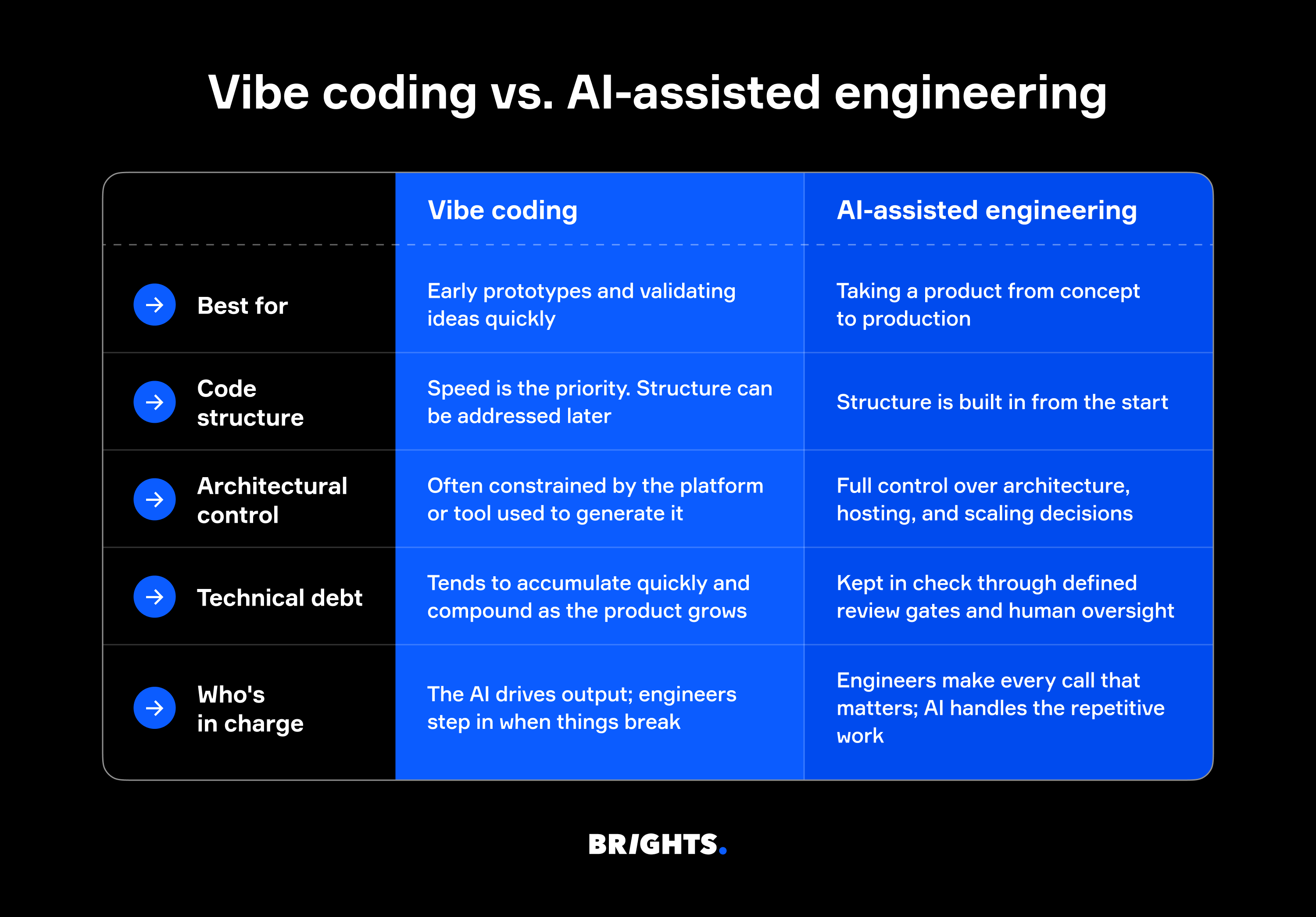
You see, vibe-coded output prioritizes speed over structure, and some tools make it harder to take full control of architecture, hosting, or scaling when you need to. When a second developer joins and can't make sense of the codebase, or when a payment integration breaks because the structure underneath won't support it, the shortcuts become very visible very quickly.
According to CISQ, accumulated technical debt in the US had already reached approximately $1.52 trillion, most of which was caused by code that was written fast and never properly structured. Rewriting all that code costs even more than doing it right from the start.
At Brights, engineers are the ones making every architectural call: AI handles the repetitive parts, and an engineer reviews every line it generates before anything moves forward. As Dmytro Umen, co-founder and CEO of Brights, puts it:
"There are faster tools than what we rely on. Lovable, Replit, and v0 can spin something up in hours, which is great for quick prototypes or flow validation. But for the MVP build, they create problems we don't want you inheriting. We use Claude Code and Cursor to give you full ownership of clean, maintainable code with no platform dependencies. It's a deliberate trade-off: slightly slower for an MVP foundation you can build on."
Where AI-assisted engineering delivers the most value
Teams using AI-assisted engineering see the biggest time savings in:
Boilerplate and code generation: Repetitive code structures that used to take hours get done in minutes, freeing engineers up for work that requires expert judgment.
Documentation: Instead of being the task everyone puts off, docs get drafted as code is written and stay in sync with the codebase. New engineers get up to speed faster as a result.
Testing: Engineers generate unit tests and regression coverage at a pace that's not realistic manually, which means more edge cases are caught before they become production bugs.
Prototyping: A proof-of-concept that used to take two to three weeks gets put together in days, which changes how quickly a team can test an idea with real users.
However, not every part of the development cycle gets faster with AI tools. McKinsey ran a study with more than 40 developers across several weeks and found that engineers completed documentation tasks in roughly half the time, wrote new code in nearly half the time, and finished code refactoring in about two-thirds the time.
For complex tasks, developers using AI tools were 25–30% more likely to finish within the allotted timeframe. On highly complex tasks, though, time savings dropped to under 10%, and developers with less than a year of experience sometimes took 7–10% longer with the tools than without them.
So yes, AI makes experienced engineers faster, but it doesn't make junior developers into senior ones. Judgment, architecture, trade-offs — those still belong to humans.
Security, code quality, and governance in AI-assisted development
Speed is the easy part to sell. Security is where enterprise clients start asking harder questions, and where a lot of AI-assisted development falls short.
The 2025 DORA State of AI-assisted Software Development report found that AI amplifies existing engineering culture. So if your review process is weak, AI-generated code makes that weakness harder to manage.
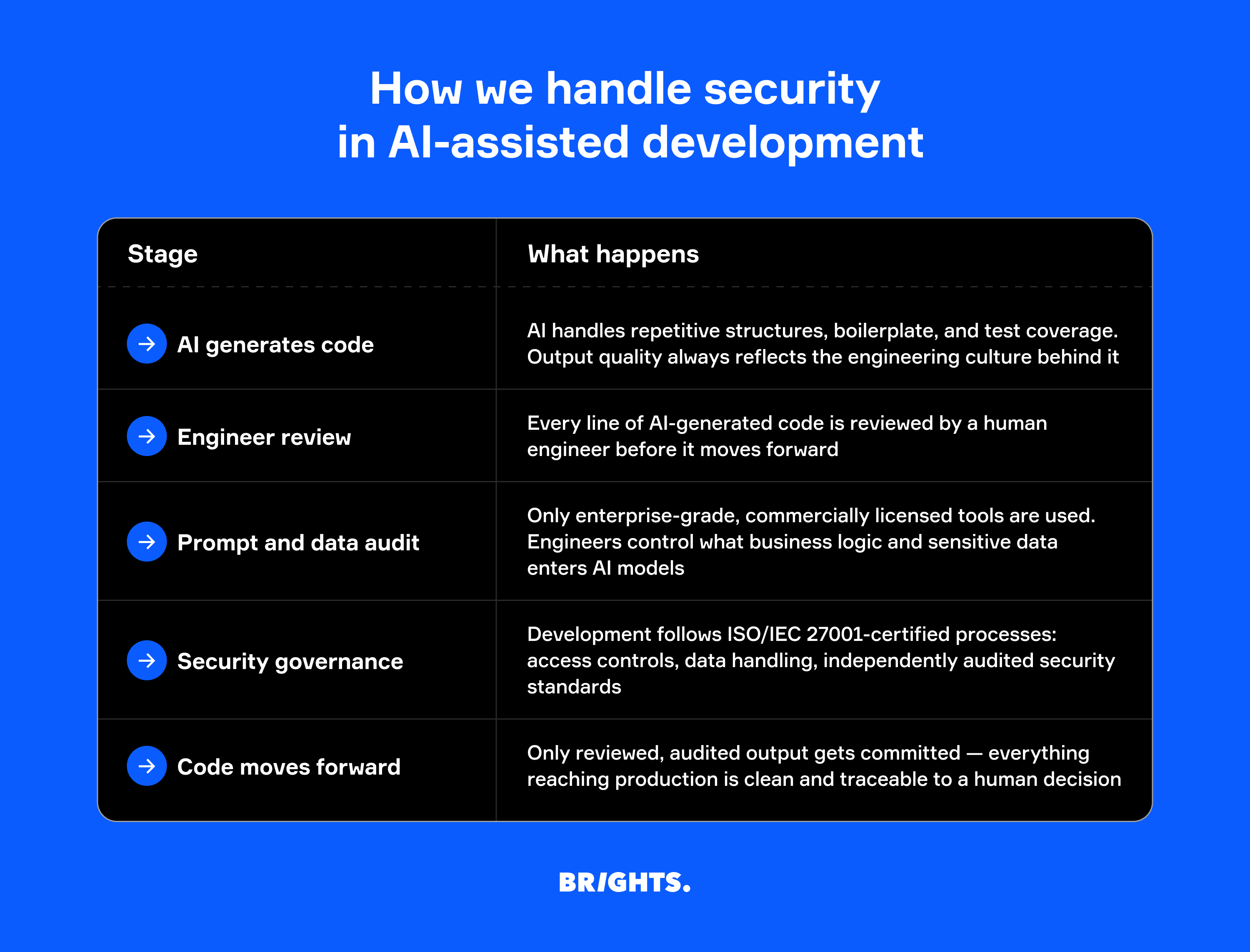
Responsible teams build security review into the workflow, meaning every line of AI-generated code goes through human review before it moves forward. It also means thinking carefully about what gets sent to third-party models in the first place. After all, prompts can contain sensitive business logic, and not every AI tool handles that data safely. Prompt injection risks and third-party model exposure are real considerations, particularly for companies in regulated industries.
Fortunately, Brights holds ISO/IEC 27001 certification, which means data handling, access controls, and security practices across the development process meet an independently audited standard, not just our internal policy.
How to evaluate an AI-assisted engineering partner
Choosing an AI-powered product engineering partner gets easier when you know what to ask (and harder to fake when you actually ask it). Here’s what’s worth checking before you sign anything:
Is AI part of their workflow or just their pitch? Ask how AI is used across the development cycle, not just in coding. If the explanation is vague, that's your answer.
Can they show delivery data? Time to MVP, defect rates, test coverage? A team that has been doing this consistently will have numbers to point to.
Who reviews AI-generated code? Every output should go through a human engineer. If there's no clear review process, there's no quality control.
How do they handle your IP and data? What goes into the AI tools, and under what terms? This matters more in regulated industries, but it’s still important everywhere.
Brights’ experience
One of our projects, a beauty service automation MVP, is a good example of how AI-assisted engineering can change delivery speed without sacrificing code quality.
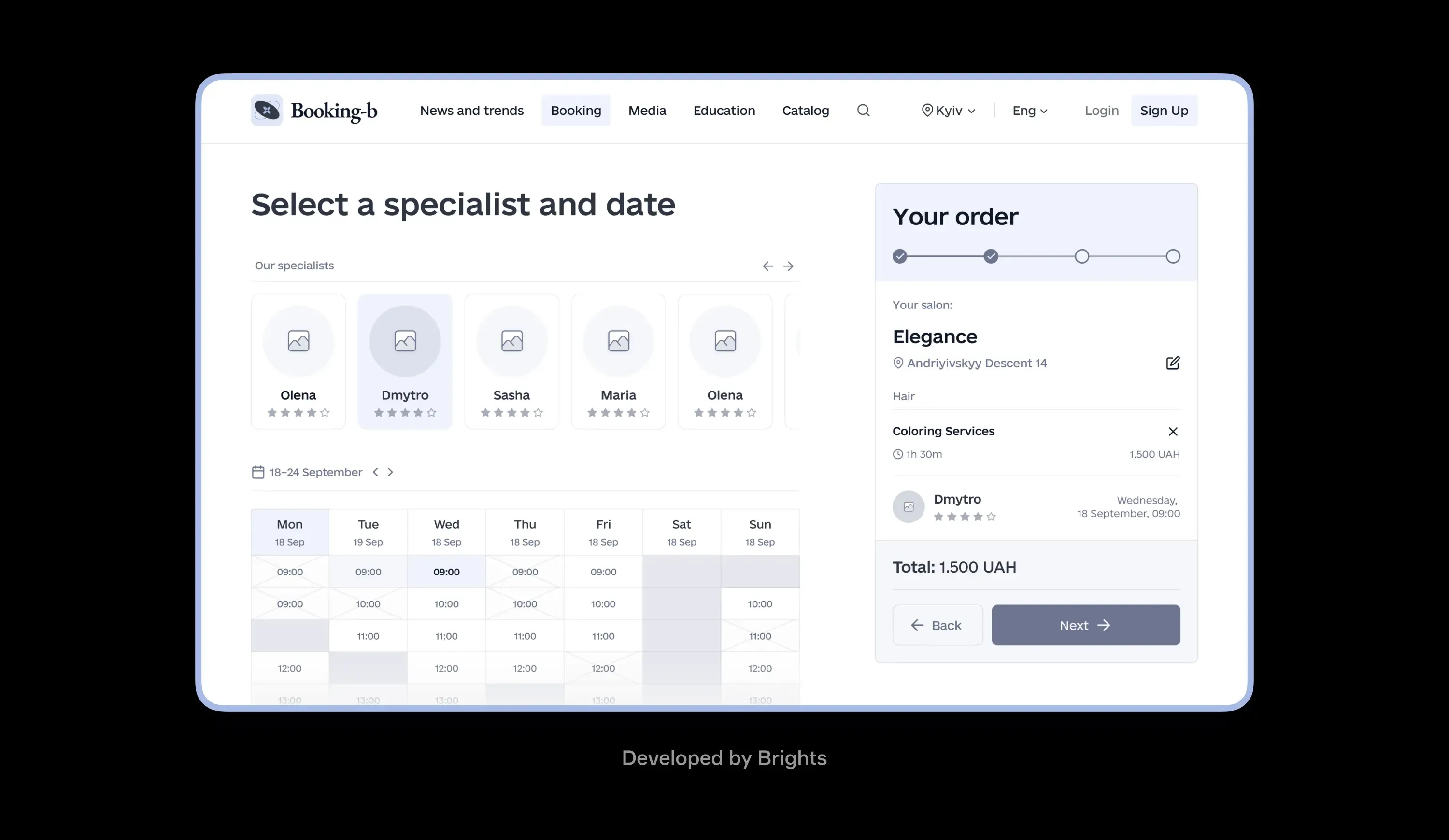
Salon owners were losing bookings and spending hours every day managing appointment requests through Instagram DMs and phone calls. No scheduling system, no availability tracking, no way to scale. The client wanted to validate if a digital booking product could solve this before committing to a full build.
With experience building AI-native products, Brights delivered a working booking system in a matter of weeks. Customers could schedule services across multiple salons with real-time availability, and the client could see immediately whether the market responded or not. After validation, the team scaled it into a full SaaS platform with CRM, payment processing, and monetization features, now serving beauty studios across the regional market.
Claude Code handled architecture and development, Cursor covered refinement and polishing, and Figma Make was used for design and prototyping. In the end, the client got full ownership of clean, maintainable code, with every line of AI-generated output reviewed by a senior engineer on our side.
Conclusion
AI-assisted engineering works when experienced software developers are running it — with clear review processes, human oversight, and AI accelerating work that was already well-structured.
Sure, vibe coding is useful for demos, but it wasn't built for production, and the difference becomes obvious very quickly. Engineering teams that have figured this out are delivering faster and accumulating less debt than those still debating whether AI tools are worth adopting seriously.
FAQ.
It depends on the state of the codebase. AI tools work well on codebases that are reasonably structured and documented. Engineers use them to speed up refactoring, generate tests, and keep docs current. On heavily tangled codebases, a technical assessment usually comes first to identify what needs addressing.


