Smarter Supply Chains: How to Design a Scalable SaaS without Risks

Companies usually start looking for management platforms when their operations become too difficult to coordinate. Yet, unlike other SaaS, supply chain management software is harder to evaluate. That is because supply chain data is scattered across systems, and teams spend more and more time stitching it together before they can make decisions.
Choosing a platform based only on features can backfire. Forecasting or visibility tools may look convincing in demos, but they tell you very little about how the product will behave in real scenarios and work within your (or your partner’s) systems.
Brights has built and improved different types of SaaS products, including supply chain management software. So, in this article, we go beyond generic descriptions. You will learn how these systems operate and what deserves the closest attention. You’ll also learn how to address the common security risks that supply chain SaaS can introduce.
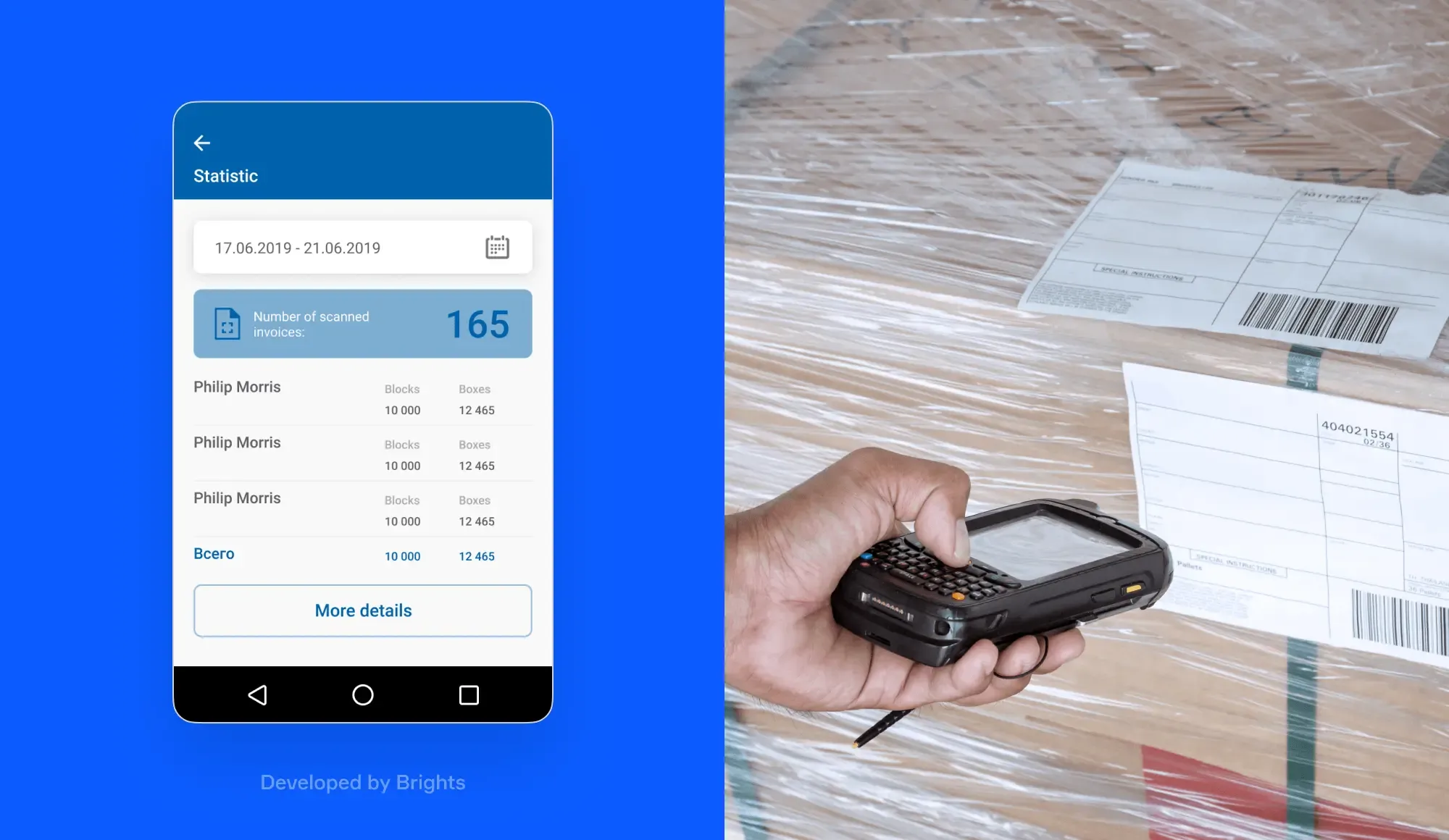
Supply chain app developed by Brights
Key takeaways
Supply chain SaaS solutions connect your ERP systems, logistics, planning, and supplier tools, making them easier to coordinate.
A reliable tool should have a clear data model, ownership rules for each business record, and strict API rules.
Enterprise-grade supply chain SaaS platforms balance real-time visibility and event-driven logic with scheduled updates and batch processing.
Organizational-level problems, like broken approval chains and siloed teams, can limit the usefulness of your supply chain SaaS.
A proper implementation requires companies to define the SaaS scope, map external partners, design integrations, enforce uniform definitions, and set up synchronization rules.
Security risks grow through misconfigured roles, third-party data exposure, weak integration layers, vendor dependency, and poor monitoring.
What supply chain management SaaS looks like
Supply chain software-as-a-service (SaaS) platforms help you coordinate the whole supply chain process. This matters because most organizations don’t manage supply chain operations in one system. They do it in separate tools, such as:
Enterprise Resource Planning (ERP) platforms
Warehouse management tools
Planners and schedulers
Transport and logistics software
Supplier portals
Let’s say a purchase moves through four separate tools across your departments and your partners’ networks. Supply chain SaaS tools connect these systems, so orders, inventory updates, and shipment records do not get lost in between.

Data model and ownership
At the core of any supply chain SaaS product is its data model. It’s a shared structure that defines key business objects (products, customer groups, shipment types, stock statuses, etc.), so your systems can track them correctly.
Data ownership defines which system holds the authoritative version of each definition. Upon encountering conflicting data, other tools will understand which definition is correct and where to find it.
Supply chain management SaaS has a transactional and orchestration layer. The transactional layer records operations across tools, while the orchestration layer combines them into a single view. Together, they connect execution and oversight, so you can coordinate the whole chain of activities from a single place.
Application Programming Interface
An application programming interface (API) allows systems to exchange data according to fixed rules, such as:
Which business object is being exchanged
Which fields are required for the order to be approved
Whether the request creates, updates, confirms, or cancels something
What response confirms success
Failure handling is a core part of the contract because supply chains generate messy and unexpected data, including duplicates and missing fields. APIs should record these anomalies and decide how to handle them.
Access control matters just as much because integrations need a scope. Your supplier needs to view only the assigned purchase orders, not your broader corporate data. Defining these boundaries upfront keeps integrations functional without becoming a security risk.
Event-driven flows
A supply chain platform has to decide whether to react to events immediately or process updates later.
Business events can trigger certain workflows. For example, if the item in a supplier confirmation doesn’t exist in the product master, the system can reject the transaction outright. Some data, such as historical spending and supplier catalogs, can be processed at set intervals without hurting visibility.
Financial and operational gains from supply chain SaaS
Supply chain management SaaS helps you make more informed decisions by improving your inventory management, procurement, forecasting, and working capital visibility. However, the exact gains depend on your existing operations.

Faster inventory turnover with less cash tied up in stock
Supply chain software gives you a complete picture of your supply and demand by combining key metrics across operations so that you can see:
Where stock is now
Where demand is rising
What supply is already on the way
Which locations are likely to run short
This helps teams place stock more strategically. They can compare current stock, incoming supply, and likely demand across locations before moving or reordering inventory. For instance, you can identify which stores are likely to sell through stock faster and which are at risk of shortages.
Shorter procurement cycle
You can analyze how long suppliers take to deliver your items, whether they miss deadlines, ship incomplete orders, or cause quality issues. Over time, this helps you compare suppliers and rank them by reliability.
Let’s not forget that companies often misdiagnose procurement delays, overlooking their internal processes. Supply chain SaaS can analyze the reasons for delays, including:
Misplaced or poor requests with missing item details, unclear dates, or wrong site codes
The time a request or order spends at different steps of the supply chain, such as email chains, forwarding, manual review, or approval
The time spent preparing an item after it arrives, such as sorting, inspections, labeling, and inventory registration
Knowing this helps you avoid longer procurement cycles that may result in canceled orders, emergency supplier changes, or rushed approvals outside negotiated terms.
Improved forecasting accuracy
Supply chain forecasting tools can combine historical data, real-time signals, and machine learning to detect patterns in demand.
Historical data analysis shows how demand for each item is affected by promotions, seasons, product launches, pricing changes, supplier constraints, and special events. These insights become more useful when you add real-time signals like current orders, stockouts, and external inputs such as weather forecasts.
Machine learning models evaluate these signals together to estimate how strongly each factor affected demand in the past. Then, the model will project how those signals shape demand in the future.
With this data, supply teams can plan demand more accurately, warehousing teams can use this data to schedule labor and allocate space, logistics teams can reserve capacity more accurately, and finance can use it to project revenue.
Clear visibility into working capital
SaaS solutions for supply chain management can show which inventory is moving, reserved, or aging, helping you identify stock that sits idle and ties up capital unnecessarily.
You can also track which stock is already committed and likely to convert into receipts soon, getting a more accurate view of your current balances. For example, if your business holds too much of an item while more of the same is already on the way, the platform surfaces that overlap before it becomes a cost.
That said, SaaS platforms don’t remove problems inside your organization. They can’t make your supplier more reliable, repair a broken approval chain, or force departments to work together.
But what they can do, when integrated thoughtfully, is improve your existing setup without making your team work harder.
How to design a scalable supply chain management SaaS solution
A supply chain SaaS solution needs to support more than your current systems (as if that wasn’t complicated enough). It also has to work with partner systems and leave room for the tools, workflows, and integrations you may need later. It sounds complicated, but if you understand what goes into designing and developing a system like this, the process stops being so intimidating.
Define the SaaS platform’s scope and scale
In supply chain management, you need to define the platform’s scope across several dimensions:
Transactional: Supported operations to be processed by your platform at a given interval
Network: Number of internal and external participants
Geographical: Supported currencies, languages, time zones, tax rules, regional policies, and so on
Architectural: Vertical or horizontal SaaS architectures that fit different operational realities
Processing: Supported supply chain domains (planning, procurement, warehousing, etc.)
A wrong assumption creates problems later. Your team may think that the software works well for the company’s network, but then discover that it needs to support multiple source systems or specific message standards.
Map the B2B ecosystem before choosing the architecture
To understand which SaaS architecture will be the best fit for the data you share, list every external service you exchange information with first.
Supply chain participants have different messaging standards, which is why you should group them by the way they exchange information. For example, you can have clusters for companies that use APIs and electronic data interchange (EDI) networks.
Doing so will help you decide where the SaaS platform can exchange data directly, where it needs middleware, and where you may require additional manual coordination.
Choose the integration model
Decide how the SaaS tool will connect to your business environment. You can choose one of three integration methods based on your SaaS technology stack and requirements.
| Aspect | Native integration | Middleware or integration platform | Custom direct integration |
|---|---|---|---|
| What it is | The SaaS vendor provides built-in connectors with predefined mappings, APIs, and event hooks. | A separate integration layer sits between systems and manages data exchange, validation, and monitoring. | A custom connection built directly between two systems without a shared integration layer. |
| Main strengths | Quick to launch and low implementation risk. | Centralizes routing, transformation, validation, retries, and monitoring across integrations. | Full control over how systems exchange data, including custom structures and validation rules |
| Limitations | Limited flexibility for custom workflows or complex logic. | Requires additional maintenance and governance, and can add operational overhead. | Harder to scale as each new connection requires new mappings, authentication, and configuration. |
Native integration works best when your existing systems already support the SaaS platform’s data formats and transfer protocols. Meanwhile, middleware is suited to complex ecosystems with multiple partners that have different data standards. We recommend reserving direct custom integration for a small number of integrations unlikely to branch into variations.
Create a shared source of truth
Avoid having too many one-off connections (point-to-point proliferation). Let’s say that your SaaS platform sends orders to ERP, which sends data to the warehouse management system, which goes further down the chain. Each link has its own field mappings, error rules, timing, and authentication.
If one system changes an API version or the file structure, you have to inspect every downstream integration. It makes shared definitions harder to govern because each connection can interpret the same record differently.
You can build shared integration components across all your systems to prevent that problem. One place will define what a specific term, such as “shipment status,” means across connected systems. If a carrier changes its message format, you update only the shared integration layer.
Develop a data synchronization strategy
Your synchronization strategy shows when data should synchronize. A scalable architecture for a SaaS tool usually mixes several patterns:
Real-time or event-driven updates for orders, delivery tracking, or urgent stockouts
Scheduled batch updates for master data loads and balancing
Periodic analytical refreshes for forecasting data
A warehouse balance can be refreshed nightly, which may be acceptable for slow-moving planning analysis. However, you can’t have a purchase order come in thirty minutes after confirmation.
Design for portability to avoid vendor lock-in
Suppose a company builds partner mappings for over 200 suppliers. If those mappings live only inside a vendor-specific interface and are poorly documented, you’d tie yourself to that environment.
To prevent vendor lock-in, companies should:
Research the documentation, especially critical business logic, key mapping, workflow rules, and APIs
Determine whether it is possible to retrieve core operational and historical data from the platform
Keep core identifiers and business rules understandable and usable outside the vendor environment
It’s also worth mentioning that middleware doesn’t automatically solve lock-in, as it can also be riddled with unextractable business logic. The dependency will simply move to the integration layer.
Additionally, portability matters when the standard platform is no longer enough. There may come a point where your SaaS in a supply chain alone can’t support all your workflows. For example, if you enter a new market with highly regulated data privacy laws. At that point, you have to decide whether you need to invest in a supported extension or develop a custom app.
Supply chain SaaS security risks and best practices
You shouldn’t assume the SaaS provider can secure everything. Even if it did, you’re still in control of which apps you connect, who can have access rights, and how the data flows between systems. This can introduce several security vulnerabilities that you need to prepare for.
| Risks | How it impacts your supply chain | Prevention and remediation practices |
|---|---|---|
| Misconfigured roles | Supply chain SaaS platforms often have many users with broad access and rarely reviewed permissions. | Establish strong IAM practices: role-based access, multi-factor authentication, and separate admin accounts. Review permissions and remove shared accounts. |
| Data exposure from third-party companies | Suppliers may store sensitive data that can leak through weak controls or misconfigured APIs. | Enforce data governance, limit portal access to required records, and add approvals for critical actions. Ensure operations can continue if one partner fails. |
| Weak integration layers | Middleware, webhooks, APIs, and third-party tools may validate data poorly or expose credentials. | Inventory connectors, integrations, automations, and scripts. Restrict each integration to the minimum permissions it requires. |
| SaaS vendor vulnerabilities | When key workflows depend on one provider, outages or breaches can disrupt operations. | Define clear SLA standards for uptime, incident response, and breach notification with your SaaS vendor. |
| Visibility gaps | Security issues can remain unnoticed if systems are reviewed only occasionally. | Monitor continuously for new integrations, permission changes, failed syncs, token activity, and unusual data access. |
Depending on your system and the SaaS type, you can deal with more risks. But don’t worry, a professional SaaS consulting and development company will warn you about them during the implementation or optimize your existing platform.
Example from Brights
One of Brights' clients, a tobacco manufacturer, was running an overly complicated, cluttered product-handling system that slowed down workers at every level. Rather than patch it, we rethought it entirely.
The result was Trust, a mobile scanning application that lets company staff scan tobacco products and manage them through a unified cloud-based database with up-to-date statistics. The goal was straightforward: make a system simple enough for a box operator and powerful enough for a top manager.

The new system shows a practical form of SaaS-style operational control. To match the operational reality, we integrated Trust with Zebra, an Android-based scanning machine, so that physical scanning activity connects directly to the shared product database.
Access was designed for speed: users can log in with a password or scan a QR code, keeping product management fast even at high volume.
As a result:
Company members can scan items and add them to one unified database
Product tracking, statistics, and logistics are managed from a single system
The app replaced a cluttered workflow with one that works for every role, from box operators to top managers
Conclusion
Supply chain SaaS solutions can provide a single operational platform for all your supply-related workflows. But to be reliable and accurate, the platform requires clear data ownership, API rules, precise synchronization timing, robust integration capabilities, and strong security.
Get those parts right, and the software can provide actual financial value to your business. Get them wrong, and it’ll create confusion, friction, and security risks.
If you’re planning to build a supply chain SaaS product or need to improve an existing one, we’re happy to offer our SaaS development services. Brights will help you find the architecture that matches your workflows, the integration model that connects with all your core systems, and the most efficient operational logic.
FAQ.
Supply chain SaaS tools scale better because you can expand them without adding new hardware or compute power. Unlike traditional software, the SaaS provider handles the infrastructure management instead of your team. Since the software runs in the cloud, businesses can connect new warehouses, carriers, and suppliers quickly and roll out features where they need to.


